Premium YouTube Thumbnail Preview Checker HTML Template
Original price was: ₹999.00.₹0.00Current price is: ₹0.00.
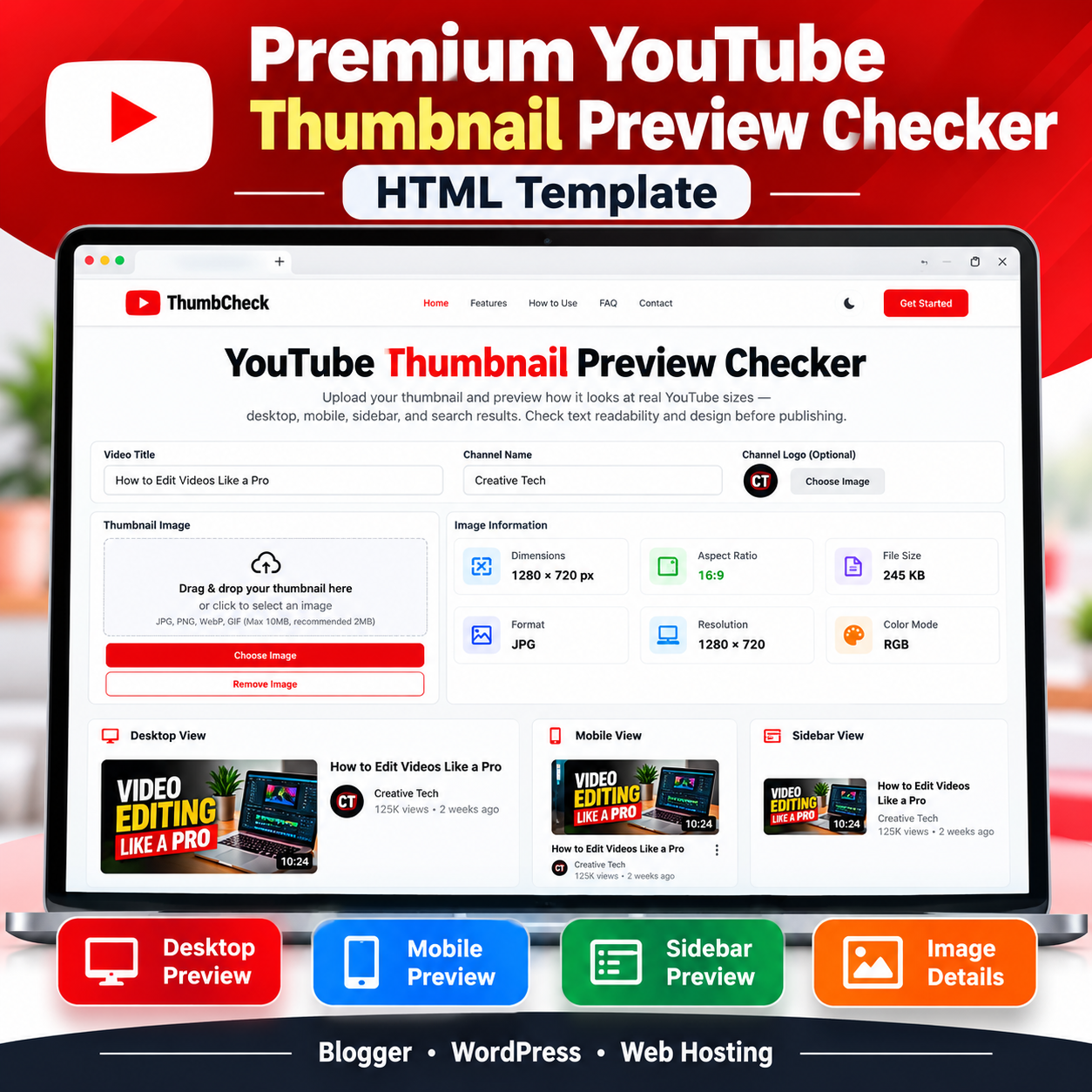
Preview your thumbnails across desktop, mobile, and sidebar layouts with this YouTube Thumbnail Preview Checker HTML Template. Includes image details and editable video information.
Compatible Platforms: Blogger, WordPress, and web hosting platforms.
File Format: TXT (HTML, CSS & JavaScript Code)
Limited-time free.
Description
Premium YouTube Thumbnail Preview Checker HTML Template Video Guide
Watch the video guide to learn more about the template and its practical use.
🎥 Video Resources & Links
The following resources and links are mentioned in the video. You can access them directly below.
📚 Free Blogger Full Course & WhatsApp Contact
Visit Free Blogger Full Course
📚 Free WordPress Full Course & WhatsApp Contact
Visit Free WordPress Full Course
🔥 Free Domain + Web Hosting (Hostinger)
Get Domain + Web Hosting From Hostinger
🎁 Hostinger Coupon Code: RESEARCHTECHNEWS
Use the coupon code RESEARCHTECHNEWS to get 10% OFF where applicable.
YouTube Thumbnail Preview Checker HTML Template helps content creators, graphic designers, and digital marketing professionals preview their thumbnail designs in simulated YouTube-style desktop, mobile, and sidebar layouts before publishing a video. This responsive website template combines an image preview interface with thumbnail dimensions, aspect ratio, file size, format, and resolution information in one convenient browser-based experience.
Designed for practical use, this HTML Template includes a branded header, navigation menu, thumbnail upload area, video information fields, channel logo upload, preview panels, feature sections, instructional content, frequently asked questions, and a footer with informational modal windows. Its red, white, and charcoal-inspired visual design gives the interface a recognizable video-creator aesthetic.
Key Features
- Multiple Thumbnail Previews: Display an uploaded thumbnail in desktop, mobile, and sidebar-style layouts to inspect its appearance at different display sizes.
- Video Title Preview: Enter a video title and see it update across the available preview layouts.
- Channel Name Preview: Enter a channel name to personalize the simulated video listing.
- Channel Logo Upload: Select an image for the channel avatar and display it in the preview layouts.
- Image Dimensions: View the uploaded image’s pixel width and height.
- Aspect Ratio Check: Inspect the image’s aspect ratio to determine whether it matches the intended thumbnail proportions.
- File Information: Display file size, image format, resolution, and specification-related information.
- Image Format Support: Accept browser-renderable image files, with the interface designed for common formats such as JPG, PNG, WebP, and GIF.
- Responsive Layout: Use a layout that adapts to desktop and smaller screens.
- Drag-and-Drop Interface: Select a thumbnail through the upload area or drag an image into the designated zone.
- Reset and Remove Controls: Clear the current thumbnail preview or reset the interface using the available controls.
- Informational Sections: Include feature explanations, usage instructions, practical benefits, limitations, and FAQ content.
How the HTML Template Works
The template uses HTML for its page structure, CSS for styling and responsive layouts, and JavaScript for the interactive preview functionality. After a user selects a thumbnail image, the browser reads the local file and displays it in the preview panels. JavaScript obtains image dimensions and file metadata for the information cards. The video title, channel name, and optional channel logo can also be updated to create a more personalized preview.
The interface is designed to help users inspect their own work. It does not automatically determine whether a thumbnail is attractive, guarantee higher click-through rates, or analyze text readability and color contrast. Users should assess these visual qualities themselves.
How to Use the Template
- Open the published thumbnail preview tool in a supported browser.
- Enter a video title and channel name in the available fields.
- Optionally select a channel logo image.
- Select a thumbnail image from your device or use the designated upload area.
- Review the desktop, mobile, and sidebar-style previews.
- Inspect the displayed dimensions, aspect ratio, file size, format, and resolution information.
- Make any required changes in your preferred image editor and upload the revised thumbnail for another review.
- Use the reset or remove-image control when you want to clear the current preview.
Customization Options
The source contains editable HTML, CSS, and JavaScript. Developers can customize the site name, colors, text, page sections, navigation labels, informational content, and general layout. The JavaScript includes a site configuration object for values such as the site name, domain, email address, phone number, and address. The supplied source contains example contact details and an example domain, so these values must be replaced with the correct information before publication.
The HTML also contains advertisement placeholder areas. Website owners can replace these placeholders with suitable advertising code when permitted by their advertising provider and platform setup. Advertising placeholders are not functioning advertisements until actual code is supplied.
Compatibility and Deployment
Standard Web Hosting: The HTML Template can be deployed on a suitable web-hosting platform by uploading the HTML file and any required assets to an appropriate directory. The supplied design contains its CSS and JavaScript within the HTML document. A suitable hosting configuration is still required to serve the page correctly.
Blogger: The template can be adapted for Blogger through a supported page, post, or embedding approach. Blogger editors and publishing restrictions may affect complete HTML documents, scripts, styles, and certain elements. Some restructuring or code adjustments may therefore be necessary.
WordPress: The template can be adapted to a WordPress website using a suitable Custom HTML block, page-template approach, or hosting file. The appropriate method depends on the WordPress configuration, theme, permissions, and whether the chosen location permits the required JavaScript and CSS. Conflicts with existing theme styles may require adjustments.
This product is a portable HTML Template, not a native Blogger XML theme or a WordPress plugin. Installation is not guaranteed to be identical across all platforms.
Technical Requirements
- A modern browser capable of rendering HTML, CSS, JavaScript, and supported image formats.
- A website or hosting environment that permits the required page markup and scripts.
- Basic familiarity with editing website files or adding supported HTML content.
- Appropriate adjustments for the selected publishing platform.
The core thumbnail preview workflow uses browser-side JavaScript and local image object URLs. No dedicated API, database, or application backend is required by the supplied core functionality. The source does not include a server-side image-processing application or a connection that uploads thumbnails to a YouTube account. If third-party advertising, analytics, or other external services are added, their separate requirements and privacy practices must be considered.
Important Limitations
The preview layouts are approximations of YouTube-style displays rather than a guarantee of an exact match on every device or YouTube interface. Actual dimensions can vary with screen size, browser zoom, and changes to the YouTube design. The source sets a 10 MB maximum for the main thumbnail upload, although its upload instructions display a 2 MB recommendation. The channel logo upload checks that the selected file is an image but does not apply the same explicit size limit.
The tool displays image information and preview layouts, but it does not publish videos, connect to a YouTube account, automatically score thumbnail quality, or perform automatic text-legibility analysis. Platform-specific deployment may also require code adjustments.
Who Can Use This HTML Template?
- YouTube creators who want to inspect thumbnail designs before publishing.
- Graphic designers who prepare thumbnail artwork for clients.
- Video editors who review creative assets.
- Content managers who check video presentation layouts.
- Marketing teams that evaluate thumbnail designs during their production workflow.
- Website owners who want to offer a browser-based thumbnail preview tool.
Frequently Asked Questions
Does this HTML Template require an API?
The core thumbnail preview functionality shown in the supplied source does not require a dedicated API.
Does it need a database or backend?
No dedicated database or application backend is required for the core browser-based preview workflow.
Can I use it on Blogger, WordPress, and web hosting?
Yes, it can be adapted for these environments, subject to their code restrictions, hosting configuration, and any necessary adjustments.
Does the tool upload thumbnails to YouTube?
No. The supplied tool is for local previewing and does not publish thumbnails or connect to a YouTube account.
Can it automatically judge thumbnail quality?
No. It displays previews and image information so users can evaluate the design themselves.
Can I change the branding and colors?
Yes. The HTML, CSS, JavaScript, and site configuration values can be edited to suit your website, subject to the user’s technical setup.
Product Summary
YouTube Thumbnail Preview Checker HTML Template provides a structured starting point for a browser-based thumbnail preview website. Its multiple preview layouts, editable video details, channel logo support, and image metadata display make it useful for creators and website owners who want a practical thumbnail review experience. Review the source, replace demonstration details, and adapt the template to your chosen publishing environment before making it available to visitors.
Related products
-
Sale!

Blogger Sitemap Generator HTML Theme
Original price was: ₹999.00.₹199.00Current price is: ₹199.00. Buy Now -
Sale!
Background Remover HTML Theme
Original price was: ₹999.00.₹199.00Current price is: ₹199.00. Buy Now -
Sale!

Premium Dhanteras Wishes HTML Template 2026
Original price was: ₹999.00.₹0.00Current price is: ₹0.00. Buy Now -
Sale!
Advanced QR Code Generator HTML Theme
Original price was: ₹999.00.₹199.00Current price is: ₹199.00. Buy Now