Premium Text to Speech HTML Template
Original price was: ₹999.00.₹0.00Current price is: ₹0.00.
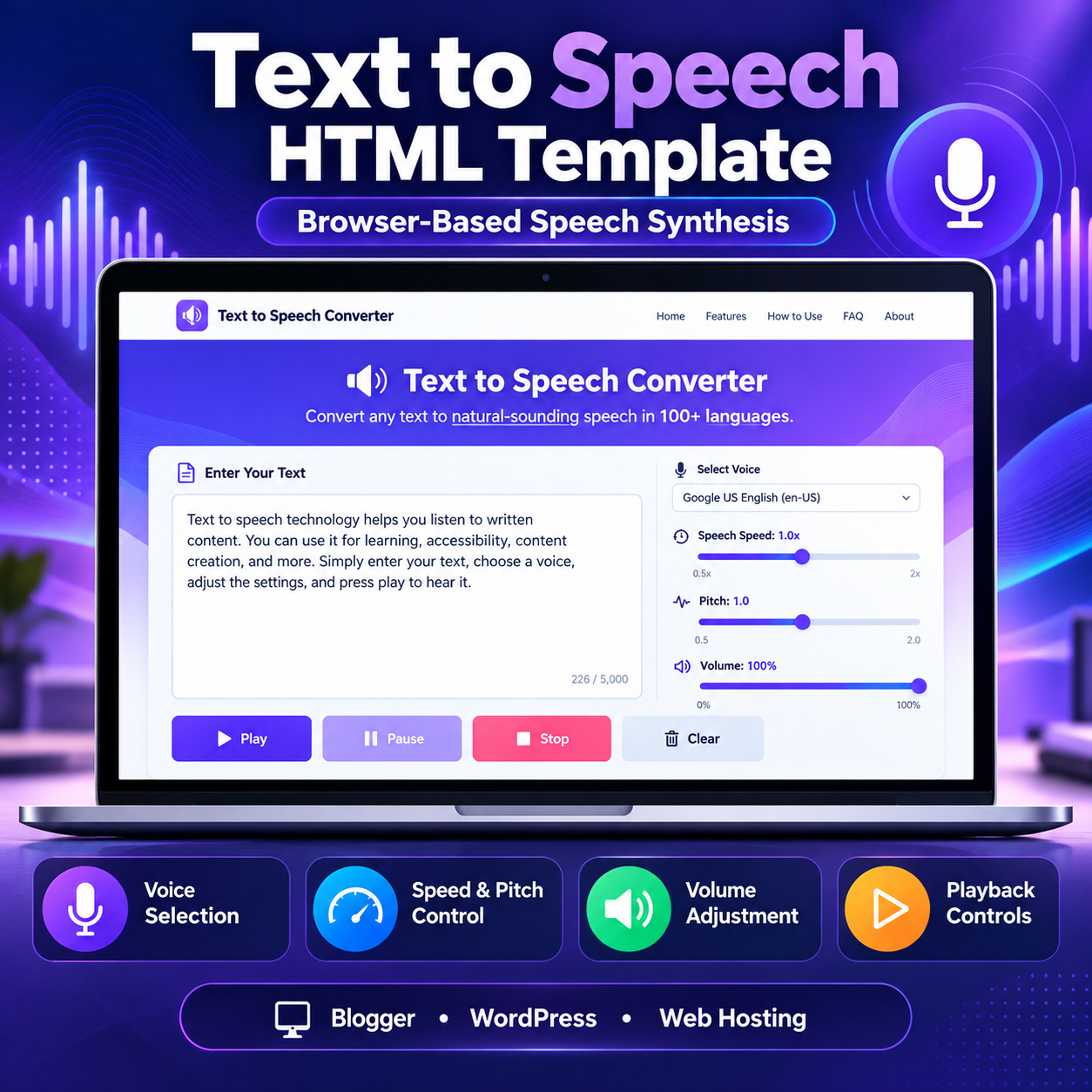
Convert written text into spoken audio with this Text to Speech HTML Template. Includes voice selection, playback controls, and adjustable speed, pitch, and volume.
Compatible Platforms: Blogger, WordPress, and web hosting platforms.
File Format: TXT (HTML, CSS & JavaScript Code)
Limited-time free.
Description
Premium Text to Speech HTML Template Video Guide
Watch the video guide to learn more about the template and its practical use.
🎥 Video Resources & Links
The following resources and links are mentioned in the video. You can access them directly below.
📚 Free Blogger Full Course & WhatsApp Contact
Visit Free Blogger Full Course
📚 Free WordPress Full Course & WhatsApp Contact
Visit Free WordPress Full Course
🔥 Free Domain + Web Hosting (Hostinger)
Get Domain + Web Hosting From Hostinger
🎁 Hostinger Coupon Code: RESEARCHTECHNEWS
Use the coupon code RESEARCHTECHNEWS to get 10% OFF where applicable.
Text to Speech HTML Template is a browser-based speech synthesis tool designed to convert written text into spoken audio using the built-in Web Speech API. This responsive HTML Template provides a practical interface for entering text, selecting an available voice, adjusting speech settings, and controlling playback directly from a compatible browser. It is suitable for developers, bloggers, website owners, educators, and digital creators who want to add a text-to-speech tool to their online projects.
Product Overview
The Premium Text to Speech HTML Template combines a clean interface with useful speech controls in a single web page. Its layout includes a navigation header, an introductory hero section, the main conversion tool, feature highlights, usage instructions, an explanation of how the technology works, limitations, frequently asked questions, and a footer with informational links. The design uses a purple and indigo color scheme, clear typography, responsive layouts, and structured content sections.
This HTML Template is built around browser speech synthesis rather than a dedicated cloud-based text-to-speech service. Users can enter or paste text into the input field, choose an available voice, adjust playback settings, and listen to the result. The input accepts up to 5,000 characters per session.
Key Features
- Text input: Enter or paste text into the main text area, with a character counter showing the current length out of 5,000 characters.
- Voice selection: Choose from voices made available by the browser and operating system.
- Speech speed control: Adjust the speaking rate from 0.5x to 2x.
- Pitch adjustment: Set the speech pitch between 0.5 and 2.0.
- Volume control: Adjust the playback volume from 0% to 100%.
- Playback buttons: Use Play, Pause, and Stop to control speech, with button states designed to reflect playback availability.
- Clear function: Clear the text input when preparing another passage.
- Status messages: Display informational, error, or success messages when applicable.
- Responsive interface: Adapt the layout for desktop computers, tablets, and mobile screens.
- Informational sections: Include usage steps, feature descriptions, accessibility use cases, limitations, and frequently asked questions.
How the HTML Template Works
The tool uses the Web Speech API and its SpeechSynthesis functionality. When a visitor presses Play, the browser requests speech synthesis for the entered text using the selected voice and configured rate, pitch, and volume. Available voices are supplied by the visitor’s browser and operating system, so the selection and speech quality can vary between devices.
The speech-generation workflow is designed to run locally through the browser’s speech synthesis functionality. It does not require a dedicated speech-generation backend or database in the supplied implementation. The template’s interface and content can be adapted to suit a website, subject to the restrictions of the chosen platform.
How to Use the Text to Speech Tool
- Open the page containing the Text to Speech HTML Template.
- Type or paste your content into the text area. The maximum input length is 5,000 characters.
- Select an available voice or language from the voice dropdown.
- Adjust the speed, pitch, and volume sliders according to your preference.
- Press Play to listen to the text.
- Use Pause or Stop when needed, or select Clear to remove the current text.
Customization Options
The source contains HTML markup, CSS styling, and JavaScript functionality that developers can review and customize. Depending on the intended deployment, adjustments may include the website name, text, color scheme, spacing, typography, navigation links, footer information, advertisement placeholders, and page content. The template also contains designated advertisement areas where a site owner can consider placing suitable ad code after reviewing the applicable platform and advertising requirements.
Changes to JavaScript should be made carefully because the voice selector, playback controls, character counter, status messages, and speech settings depend on the existing implementation. Any custom changes should be tested in the target browser and deployment environment.
Platform Compatibility
Blogger
This HTML Template can be adapted for Blogger through an appropriate page, post, or supported embedding method. Blogger editors may restrict or modify scripts, styles, or complete HTML documents. The standalone file may therefore require restructuring or other adjustments before the tool works correctly.
WordPress
The template can be adapted for WordPress using a suitable Custom HTML block, page-template approach, or hosting file, depending on the site’s configuration. Some WordPress editors, themes, security settings, and plugins restrict JavaScript or alter page styles. Test the implementation before publishing it for visitors.
Standard Web Hosting
On a standard hosting platform, the HTML file and any required assets can be uploaded to an appropriate web directory when the hosting environment supports the setup. Review the site’s file structure and test the published page to ensure that its styles, scripts, navigation, and speech controls work as expected.
This product is a portable website HTML Template, not a native Blogger XML theme or a WordPress plugin. Compatibility is subject to the target platform, browser, and any necessary integration work.
Technical Requirements
- A modern browser with support for the Web Speech API’s speech synthesis functionality.
- HTML, CSS, and JavaScript support in the chosen deployment environment.
- Available voices supplied by the browser and operating system.
- No dedicated text-to-speech API key or application database is required by the supplied core workflow.
Important Limitations
- Voice availability, language selection, pronunciation, and speech quality depend on the browser and operating system.
- The input is limited to 5,000 characters per session.
- The supplied tool provides real-time speech playback and does not include functionality to download generated speech as an MP3 or WAV file.
- Some browsers may pause speech when the tab is in the background or the device screen is locked.
- Offline operation depends on the page already being available and on browser caching and voice availability.
- Platform integration may require code adjustments, and compatibility is not guaranteed to be identical across all environments.
Who Can Use This HTML Template?
This HTML Template can be useful for website developers, bloggers, educators, students, language learners, writers, accessibility-focused projects, and content publishers. It provides a starting point for a browser-based tool that lets visitors listen to written content without requiring a separate account within the supplied tool.
Frequently Asked Questions
Does the template require a dedicated speech API?
No dedicated third-party speech API is required for the supplied core workflow. It uses the browser’s Web Speech API, where supported.
Can visitors download the generated audio?
No. The supplied implementation plays speech in real time and does not provide an MP3 or WAV export function.
Does it support multiple languages?
It can use the voices available on the visitor’s device. The number of languages and voices varies by browser and operating system.
Can I use this HTML Template on Blogger, WordPress, or hosting?
Yes, it can be adapted for these platforms, subject to their code restrictions and any required layout, script, or styling adjustments.
Can I change the appearance?
Yes. The HTML and CSS can be customized, while JavaScript changes should preserve the speech controls and their dependencies.
Product Summary
The Premium Text to Speech HTML Template provides a structured, responsive starting point for a browser-based speech synthesis website. With text entry, voice selection, playback controls, adjustable speech settings, informational content, and adaptable page styling, it is a practical option for developers and website owners who want to incorporate text-to-speech functionality into their projects.
Related products
-
Sale!

Advanced QR Code Generator HTML Theme
Original price was: ₹999.00.₹199.00Current price is: ₹199.00. Buy Now -
Sale!
WebP to JPG Converter HTML Theme
Original price was: ₹999.00.₹199.00Current price is: ₹199.00. Buy Now -
Sale!
Blogger Sitemap Generator HTML Theme
Original price was: ₹999.00.₹199.00Current price is: ₹199.00. Buy Now -
Sale!
Professional Invoice Generator HTML Theme
Original price was: ₹999.00.₹199.00Current price is: ₹199.00. Buy Now