Premium Smart Word Counter HTML Template
Original price was: ₹999.00.₹0.00Current price is: ₹0.00.
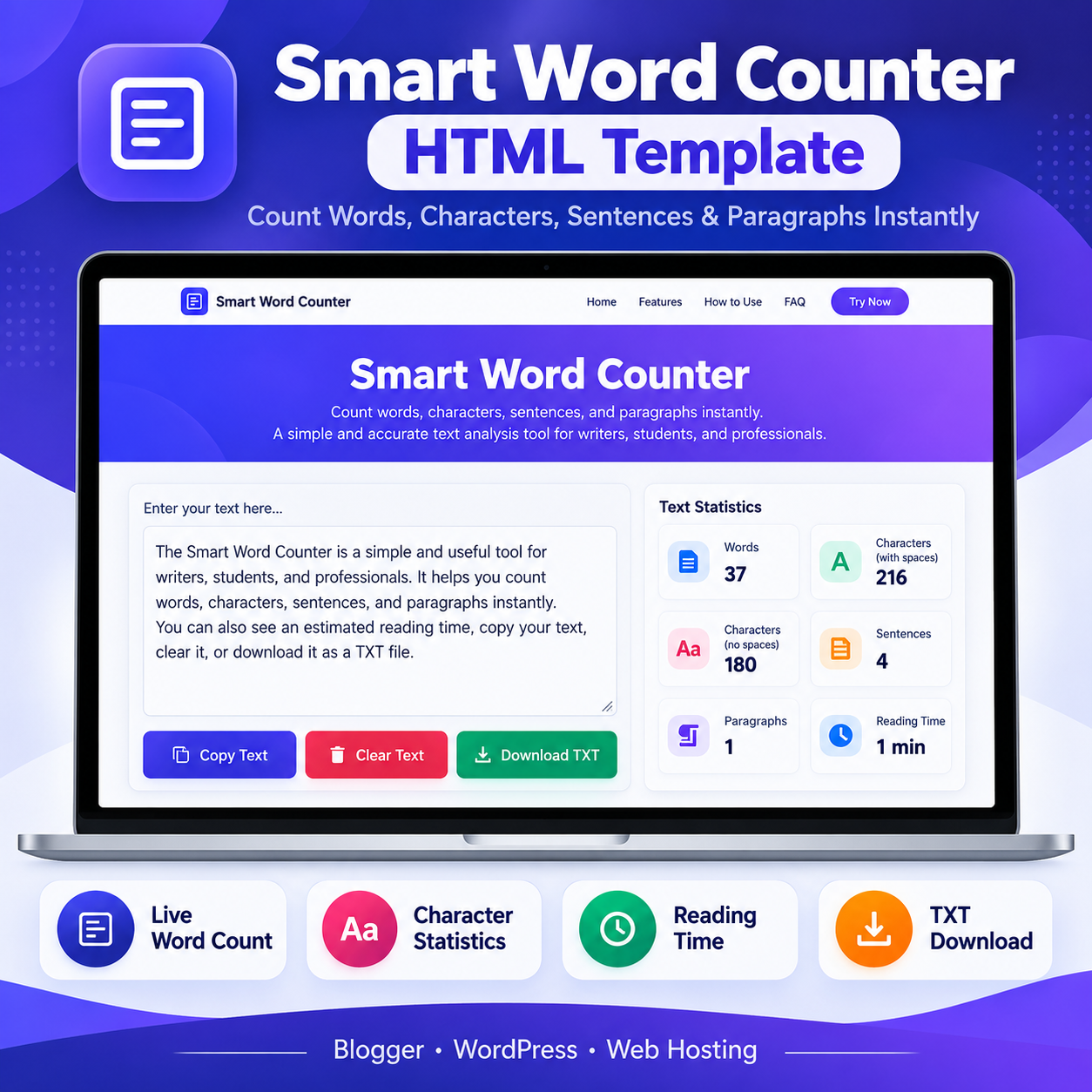
Count words, characters, sentences, and paragraphs instantly with the Smart Word Counter HTML Template. Includes live statistics, reading time estimates, text copying, and TXT downloads.
Compatible Platforms: Blogger, WordPress, and web hosting platforms.
File Format: TXT (HTML, CSS & JavaScript Code)
Limited-time free.
Description
Premium Smart Word Counter HTML Template Video Guide
Watch the video guide to learn more about the template and its practical use.
🎥 Video Resources & Links
The following resources and links are mentioned in the video. You can access them directly below.
📚 Free Blogger Full Course & WhatsApp Contact
Visit Free Blogger Full Course
📚 Free WordPress Full Course & WhatsApp Contact
Visit Free WordPress Full Course
🔥 Free Domain + Web Hosting (Hostinger)
Get Domain + Web Hosting From Hostinger
🎁 Hostinger Coupon Code: RESEARCHTECHNEWS
Use the coupon code RESEARCHTECHNEWS to get 10% OFF where applicable.
Smart Word Counter HTML Template is a browser-based text analysis tool designed to help writers, bloggers, students, editors, SEO specialists, and professionals measure the length of their text quickly. This HTML Template provides live word counting, character statistics, sentence and paragraph counts, an estimated reading time, text copying, and TXT file downloading through a clean, responsive interface. It is suitable for adapting into a website tool on Blogger, WordPress, or a standard web-hosting platform, subject to platform-specific restrictions and any necessary adjustments.
Product Overview
The Smart Word Counter HTML Template offers a straightforward workspace where users can type or paste text into an editor and view updated statistics as they work. Instead of manually counting words or estimating document length, users can review several text measurements in one place. The interface includes a dedicated text area, action buttons, and a statistics dashboard arranged to make the results easy to understand.
The template uses a modern design with an indigo and purple color scheme, a prominent introduction section, navigation links, feature cards, usage instructions, frequently asked questions, and a footer. Its responsive layout is designed for different screen sizes, including mobile phones, tablets, laptops, and desktop computers.
Key Features and Practical Benefits
- Live word count: View the number of words in the entered text as you type or paste content.
- Character count with spaces: Check the total character count, including whitespace and line breaks.
- Character count without spaces: Review a separate character statistic that excludes whitespace.
- Sentence count: View the sentence count calculated by the tool’s JavaScript logic.
- Paragraph count: Identify non-empty text blocks separated by one or more blank lines.
- Reading time estimate: See an estimated reading duration based on 200 words per minute.
- Copy Text: Use the copy button to copy the entered text to the clipboard when browser permissions and support allow it.
- Clear Text: Clear the editor before starting another text analysis task.
- Download TXT: Save the entered text as a plain-text file from the browser.
- Responsive interface: Use the tool layout on a range of mobile and desktop screen sizes.
- Unicode-aware handling: The implementation includes Unicode-aware handling for character counting, including emoji and accented characters.
How the HTML Template Works
The tool provides a text editor and a set of statistics that respond to changes in the entered content. Users do not need to submit a form for each count. The JavaScript functionality processes the text in the browser and updates the relevant figures as the content changes. The displayed reading time is an estimate rather than a guarantee of how long an individual reader will take.
The interface also includes buttons for copying, clearing, and downloading text. These controls help users move from checking content length to saving or reusing their text without navigating away from the tool.
How to Use the Word Counter
- Open the page containing the Smart Word Counter HTML Template.
- Type text into the editor or paste existing content from a document, article, email, assignment, or other source.
- Review the live word, character, sentence, and paragraph statistics.
- Check the estimated reading time when planning the length of your content.
- Use Copy Text if you want to copy the content, Clear Text to reset the editor, or Download TXT to save a plain-text copy.
Who Can Use This Template?
Writers and bloggers can check article length before publishing. Students can review the length of essays and assignments against their own requirements. SEO specialists can measure the length of titles, descriptions, and other text, while remembering that character counts alone do not determine search performance. Editors and content managers can review headlines, drafts, and written material. Translators and professionals can use the statistics to estimate text volume and keep reports, emails, and presentations concise.
Platform Compatibility and Adaptation
Blogger: The HTML Template may be adapted for a Blogger page, post, or supported embedding area. The correct approach depends on Blogger’s editor and code restrictions. A complete standalone HTML document may need to be adjusted before insertion, and scripts or page structure may be restricted or altered by the platform.
WordPress: The template may be integrated through a suitable Custom HTML block, a compatible page or template method, or a hosted HTML file. The appropriate method depends on the WordPress configuration, theme, hosting setup, and permissions for JavaScript and CSS. Some environments may require additional adjustments to prevent style conflicts or script restrictions.
Standard web hosting: Where the hosting environment supports static website files, the HTML Template and its required assets can be uploaded to an appropriate web directory. The exact deployment method depends on the hosting configuration and the files included in the download.
This product is an adaptable HTML Template, not a native Blogger XML theme or a WordPress plugin. Compatibility should be checked in the intended environment before publication.
Technical Requirements and Dependencies
The supplied source uses HTML for structure, CSS for presentation, and JavaScript for interactive text analysis. The core counting workflow is designed to run in the browser. The supplied implementation does not indicate a requirement for a dedicated application database or a server-side processing system for its core counting functions. The counting logic is client-side, and the source describes entered text as being processed locally by the tool.
Modern browser support is recommended for reliable operation of the editor, clipboard functionality, and file download controls. Copying text can depend on browser permissions or security context. Hosting, embedding, or modifying the template may introduce additional platform-specific requirements.
Customization Options
The source includes editable HTML, CSS, and JavaScript, allowing a developer or technically confident site owner to adjust the appearance, wording, colors, layout, and supported behavior. Possible presentation changes include updating the site name, navigation labels, heading text, color palette, spacing, feature descriptions, and footer content. The source also contains advertisement placeholder areas that can be configured according to the website owner’s advertising setup and applicable platform policies.
Changes to the counting logic should be tested with different text types, languages, punctuation, whitespace, and Unicode characters. Modifications to styles or page structure should also be checked on mobile and desktop layouts.
Important Limitations
- Reading time is an estimate based on the configured rate of 200 words per minute.
- Sentence counting depends on the implemented punctuation and text-processing rules.
- Platform restrictions may require code restructuring or changes before deployment.
- Clipboard behavior can vary by browser and security permissions.
- Responsive design does not guarantee identical rendering in every theme, browser, or embedded environment.
- The template should be tested after customization, especially when scripts, styles, or navigation are modified.
Frequently Asked Questions
What is the Smart Word Counter HTML Template?
It is a website template for counting words, characters, sentences, paragraphs, and estimated reading time, with options to copy, clear, and download entered text.
Does the counter update automatically?
Yes. The intended workflow updates the displayed statistics as the user types or pastes text into the editor.
Can I use this HTML Template on Blogger or WordPress?
Yes, it can be adapted for suitable Blogger and WordPress implementations, but the insertion method and any required code changes depend on the platform’s restrictions and configuration.
Can I host the template on my own website?
It can be deployed on a standard web-hosting platform that supports the required HTML, CSS, and JavaScript files.
Does the core counting workflow need a database?
The supplied implementation performs its core text counting in the browser and does not indicate a database requirement for those functions.
Can I save the entered text?
Yes. The interface includes a Download TXT control for saving the entered text as a plain-text file.
Choose a Practical Text Analysis Tool
The Smart Word Counter HTML Template combines useful text statistics, a clear editing workspace, and convenient text-handling controls in one adaptable website interface. It is a practical starting point for site owners who want to offer a browser-based word counting utility. Review the source, select a suitable deployment method, and test the finished page in your target environment before publishing it.
Related products
-
Sale!

Blogger Sitemap Generator HTML Theme
Original price was: ₹999.00.₹199.00Current price is: ₹199.00. Buy Now -
Sale!
Advanced QR Code Generator HTML Theme
Original price was: ₹999.00.₹199.00Current price is: ₹199.00. Buy Now -
Sale!
Happy Diwali Wishes 2025 HTML Theme
Original price was: ₹999.00.₹149.00Current price is: ₹149.00. Buy Now -
Sale!

Premium Dhanteras Wishes HTML Template 2026
Original price was: ₹999.00.₹0.00Current price is: ₹0.00. Buy Now