
Introduction
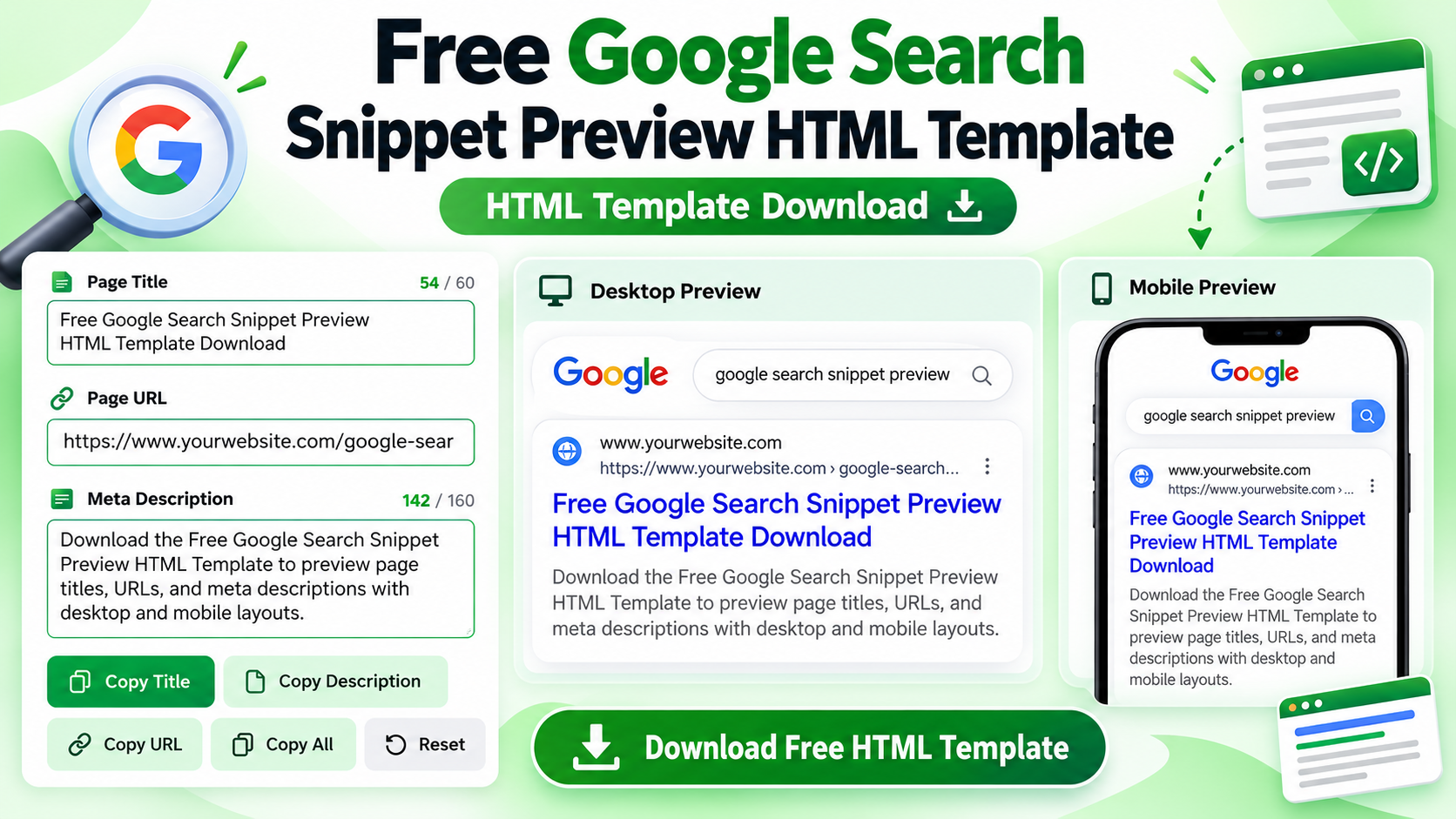
Optimizing page titles and meta descriptions is an important part of on-page SEO. The Free Google Search Snippet Preview HTML Template helps bloggers, website owners, SEO professionals, and content creators visualize how a webpage might appear in a Google-style organic search result.
This browser-based tool lets you enter a page title, URL, and meta description and view the changes instantly. It includes desktop and mobile preview modes, character counters, URL validation, and convenient copy options to help you prepare your search snippet before publishing.
In this guide, you will learn about the template’s features, how to use it, installation methods, customization options, platform compatibility, and technical requirements.
Free Google Search Snippet Preview HTML Template Download
Download the HTML template to preview page titles, URLs, and meta descriptions in a simple, interactive interface.
📥 Download Free Google Search Snippet Preview HTML Template
Google Search Snippet Preview HTML Template Video Guide
Watch the video guide to learn more about the template and its practical use.
🎥 Video Resources & Links
The following resources and links are mentioned in the video. You can access them directly below.
📚 Free Blogger Full Course & WhatsApp Contact
Visit Free Blogger Full Course
📚 Free WordPress Full Course & WhatsApp Contact
Visit Free WordPress Full Course
🔥 Free Domain + Web Hosting (Hostinger)
Get Domain + Web Hosting From Hostinger
🎁 Hostinger Coupon Code: RESEARCHTECHNEWS
Use the coupon code RESEARCHTECHNEWS to get 10% OFF where applicable.
📥 Free Google Search Snippet Preview HTML Template Download
Google Search Snippet Preview HTML Template
What Is the Google Search Snippet Preview HTML Template?
The Google Search Snippet Preview HTML Template is a browser-based utility that simulates the appearance of a search result. It displays a webpage title, website domain, URL breadcrumb, and meta description in a search-result-style layout.
You can enter your own content and immediately see how it looks in the preview. The tool also provides character-count guidance and basic URL validation to help you identify common formatting issues.
This template is suitable for bloggers, WordPress website owners, SEO beginners, digital marketers, and content creators who want to prepare search snippet content without relying on an external SEO API.
Important: This is an independent preview tool, not an official Google product. Its visual simulation cannot guarantee how Google will display your actual search result.
Key Features of the Free HTML Template
- Live search snippet preview: See changes to your page title, URL, and meta description as you enter information.
- Desktop preview: View the simulated search result in a wider layout.
- Mobile preview: Switch to a narrower preview layout designed to approximate a mobile result.
- Title character counter: Count title characters and review guidance for the recommended 50–60 character range.
- Meta description counter: Count description characters and review the recommended 140–160 character range.
- URL validation: Check whether the entered page URL uses a valid HTTP or HTTPS format.
- Copy Title: Copy your page title for use in your website editor or SEO plugin.
- Copy Description: Copy the meta description for reuse when preparing page metadata.
- Copy URL: Copy the entered URL when it passes validation.
- Copy All: Copy the title, URL, and meta description together in a formatted text block.
- Reset function: Restore the example title, URL, and description supplied with the template.
- Open Page link: Open the entered URL when a valid URL is provided.
- Snippet analysis: Review character counts, URL status, and whether the main fields have been completed.
- SEO guide: Access educational information about search snippets and content-length recommendations.
- Navigation menu: Navigate to the tool, instructions, features, SEO guide, and FAQ sections.
- Legal information panels: Access About Us, Contact Us, Privacy Policy, Disclaimer, and Terms and Conditions panels.
- Responsive interface: Use a flexible layout that adapts to different screen sizes.
- Advertisement placeholders: Customize the four designated advertising areas with suitable ad code where permitted.
How Does the HTML Template Work?
The template uses HTML to structure its interface, CSS for styling, and JavaScript to process information in the browser.
When you enter a title, URL, or description, the JavaScript updates the preview and relevant indicators. It counts characters, checks the URL format, and generates a simulated search result without sending the entered text to a dedicated backend server.
The URL parser extracts the hostname and pathname to create a simplified breadcrumb display. When the URL is valid, the interface can also provide a link to open the destination.
The recommended title and description lengths are guidelines rather than official Google display limits. Actual search results can vary, and Google may choose different title links or snippets depending on the search query and page content.
How to Use the Free Google Search Snippet Preview Tool
- Open the tool: Visit the webpage where the HTML template has been installed.
- Enter the page title: Type the title you want to preview in the Page Title field.
- Check the character count: Review the title counter and its length guidance.
- Enter the page URL: Paste the full URL beginning with HTTP or HTTPS.
- Write a meta description: Add a concise summary that accurately describes the webpage.
- Review the live preview: Check how the title, URL, and description appear in the simulated result.
- Switch preview modes: Select Desktop or Mobile to compare the two layouts.
- Review the analysis: Check the field completion indicators, URL status, and character counts.
- Copy your content: Use Copy Title, Copy Description, Copy URL, or Copy All to reuse your text.
- Open the destination: Use the Open Page link when available to visit the entered URL.
URL validation does not confirm that a page exists, is accessible, or has been indexed by Google. It checks the URL format rather than the actual search status of the webpage.
How to Install the HTML Template
The Free Google Search Snippet Preview HTML Template can be hosted as a standalone HTML page or incorporated into a compatible website environment. The best method depends on the platform’s support for HTML, CSS, and JavaScript.
Method 1: Install as a Standalone HTML Page
- Obtain the complete HTML source code for the template.
- Save the code as an HTML file using a suitable text editor.
- Keep the HTML structure, CSS styles, and JavaScript code required by the tool.
- Open the file in a modern browser and test its interactive features.
- Upload the file to a suitable static hosting service or web server.
- Visit the published page and test the title field, URL field, description field, preview modes, and copy functions.
- Check the page on desktop and mobile devices before sharing it with visitors.
Method 2: Embed the Template on a Website
- Choose a page or template location that supports the required HTML, CSS, and JavaScript.
- Insert the source code into the appropriate editor or template location.
- Check whether the platform removes script elements or restricts certain HTML attributes.
- Save the page and preview the result.
- Test the interactive features and responsive layout after publishing.
Some website editors restrict JavaScript inside page content. If the tool does not work after embedding, hosting it as a standalone HTML page may be a more suitable option.
Customization Options
The HTML template includes CSS variables and component styles that can be modified by users familiar with basic HTML and CSS. It does not provide a separate visual configuration dashboard, so source-code edits may be necessary.
- Color scheme: Customize the green theme, background colors, text colors, borders, and status indicators.
- Typography: Adjust font choices and text sizes to suit your website.
- Layout and spacing: Modify section padding, gaps, border radii, and responsive layout rules.
- Default example content: Change the initial title, URL, and description used by the preview.
- Character guidance: Modify the recommendation values and related messages in the source code.
- Advertisement areas: Replace the four ad placeholders with suitable advertising code where permitted.
- Legal information: Customize the text in the About Us, Contact Us, Privacy Policy, Disclaimer, and Terms and Conditions panels.
- Interface wording: Update headings, labels, instructions, and button text while preserving the corresponding JavaScript selectors.
Be careful when editing element IDs, event handlers, or structural markup. These changes can affect the tool’s functionality, so test the entire application after customization.
Blogger Compatibility
The Free Google Search Snippet Preview HTML Template may be used with Blogger when the necessary HTML, CSS, and JavaScript can be hosted or inserted in a supported location.
One option is to host the complete HTML file separately and link to it from a Blogger page. This can be more practical than inserting a large JavaScript application directly into a post editor.
If you want the tool to appear inside a Blogger page or theme, check how Blogger handles script tags, inline styles, and other HTML attributes. Some code placements may be restricted or modified.
After installation, publish or preview the page and test all controls. Do not assume that the template will work unchanged in every Blogger editor or theme.
WordPress Compatibility
The template may be used on WordPress installations that support its required HTML, CSS, and JavaScript.
A Custom HTML block can be suitable for supported markup, but WordPress editors, user permissions, security plugins, and hosting configurations may restrict JavaScript in page content.
For greater control, consider a suitable standalone HTML page or a custom theme integration that preserves the required scripts and styles.
The article’s YouTube video guide uses an iframe. If your WordPress editor or security settings restrict iframe embeds, use a supported video-embedding method.
After installation, check the interactive controls and make sure the template’s styles do not unintentionally affect other parts of your website.
Other Compatible Hosting Platforms
The Free Google Search Snippet Preview HTML Template can also be hosted on platforms that support static HTML files, CSS, and client-side JavaScript.
Static hosting is sufficient for the core preview functionality because processing takes place in the visitor’s browser. Platforms that strip scripts or allow only restricted HTML may require an alternative installation method.
When embedding the tool into an existing website, check for content security policies, iframe restrictions, JavaScript restrictions, and possible CSS conflicts. Always test the final published page.
Does the Template Require an API or Backend?
No API or backend is required for the core functionality of the Google Search Snippet Preview HTML Template. Its main features use browser-side HTML, CSS, and JavaScript.
The template does not require a database or server-side processing to preview titles, URLs, and descriptions, count characters, validate URL formats, or copy text.
The source code does not load external JavaScript libraries, stylesheets, fonts, or images. However, the published page still needs suitable hosting to be accessible to visitors.
The YouTube video embed used in this article relies on YouTube as an external service. This does not mean the preview tool itself requires a YouTube API or backend.
Clipboard operations may depend on browser support, security conditions, and permissions. The template includes a fallback copy method, but copying may not succeed in every environment.
Benefits and Practical Use Cases
For Bloggers
Bloggers can preview proposed post titles and meta descriptions before publishing articles. The character counters and live preview make it easier to compare wording and review the presentation.
For WordPress Website Owners
WordPress users can draft search snippet content and copy it into their preferred SEO plugin or publishing workflow. The tool does not automatically update metadata on a live webpage.
For SEO Beginners
Beginners can experiment with different titles and descriptions to understand how text length and URL formatting affect a simulated search result.
For Content Teams
Editors can use the Copy All function to collect the title, URL, and meta description in one formatted text block for review and reuse.
For Privacy-Conscious Users
The core processing happens in the browser, so the entered title, URL, and description do not need to be sent to a dedicated processing server.
Limitations and Important Notes
- Visual simulation only: The preview is not an exact reproduction of Google’s search results.
- No indexing check: The tool does not verify crawling, indexing, or search visibility.
- No keyword research: It does not calculate keyword difficulty, search volume, or ranking positions.
- No automatic metadata updates: It does not change the title tag or meta description of a live webpage.
- Approximate character guidance: Recommended lengths are not guaranteed display limits.
- Possible Google rewrites: Actual search results can display different titles or descriptions.
- Limited URL validation: A valid URL format does not guarantee that the destination exists or works.
- Platform restrictions: Some editors and hosting environments restrict JavaScript, iframes, or other HTML elements.
- Clipboard compatibility: Copy functions may behave differently depending on the browser and security settings.
- Legal content requires review: The included legal panels should be customized to reflect the actual website and its practices.
- Ad slots are placeholders: The four designated advertising areas do not automatically contain active ads.
Frequently Asked Questions
1. What is the Free Google Search Snippet Preview HTML Template?
It is a browser-based HTML tool that simulates how a page title, URL, and meta description might appear in an organic search result.
2. Is the Google Search Snippet Preview HTML Template free?
The supplied template identifies the tool as free to use. Review any applicable licensing terms before redistributing the source code or using it in a commercial project.
3. Does the template require an API or backend?
No. The core preview, character-count, URL-validation, and copy features run in the browser without a dedicated API, backend, or database.
4. Can I use this HTML template on Blogger?
Yes, if you can host or insert the required code in a supported location. Blogger may restrict scripts or modify embedded code, so test the published page.
5. Can I use the template on WordPress?
It may work on WordPress installations that support the necessary HTML, CSS, and JavaScript. Editor permissions, plugins, and hosting restrictions can affect compatibility.
6. Does the tool check Google indexing?
No. It previews search snippet content and checks URL formatting. It does not verify whether a page has been crawled or indexed.
7. Can I preview snippets on desktop and mobile?
Yes. The tool provides Desktop and Mobile controls that change the width and layout of the simulated search result.
8. What are the recommended title and description lengths?
The template recommends approximately 50–60 characters for titles and 140–160 characters for meta descriptions. These are guidelines rather than fixed Google display limits.
9. Does the tool save my entered information?
The supplied source code processes the entered title, URL, and description locally in the browser. It does not send them to a dedicated backend or save them in cookies or local storage.
10. Can I customize the design?
Yes. You can edit the CSS variables, component styles, default example content, interface text, and legal panel content. Preserve the JavaScript relationships between elements when making changes.
Conclusion
The Free Google Search Snippet Preview HTML Template offers a practical way to draft and visualize page titles, URLs, and meta descriptions before publishing website content. Its live preview, desktop and mobile modes, character counters, URL validation, and copy options make it useful for bloggers, website owners, and SEO beginners.
Because its core functionality runs in the browser, it does not require a dedicated API or backend. You can host it as a standalone HTML page or integrate it into a compatible website environment, subject to platform restrictions.
Use the preview to improve your draft, then review the actual webpage before publishing. Remember that the final appearance of a search result is determined by the search engine and may differ from the simulated preview.