Premium Advanced QR Code Generator HTML Template
Original price was: ₹999.00.₹99.00Current price is: ₹99.00.
Create customized QR codes with this Advanced QR Code Generator HTML Template. Includes URL, social media, and UPI modes, logo overlay, color controls, and PNG, JPEG, or SVG downloads.
Compatible Platforms: Blogger, WordPress, and web hosting platforms.
File Format: TXT (HTML, CSS & JavaScript Code)
Limited-time free.
Description
Advanced QR Code Generator HTML Template is a browser-based tool for creating customized QR codes for website URLs, social media links, and UPI payments. This responsive HTML Template lets users personalize QR code colors, add a logo, choose image dimensions, configure error correction, adjust the quiet-zone margin, preview generated codes, and download results in PNG, JPEG, or SVG format. Built with HTML, CSS, and JavaScript, it provides a practical website utility that can be adapted for Blogger, WordPress, and standard web hosting, subject to each platform’s restrictions.
Product Overview
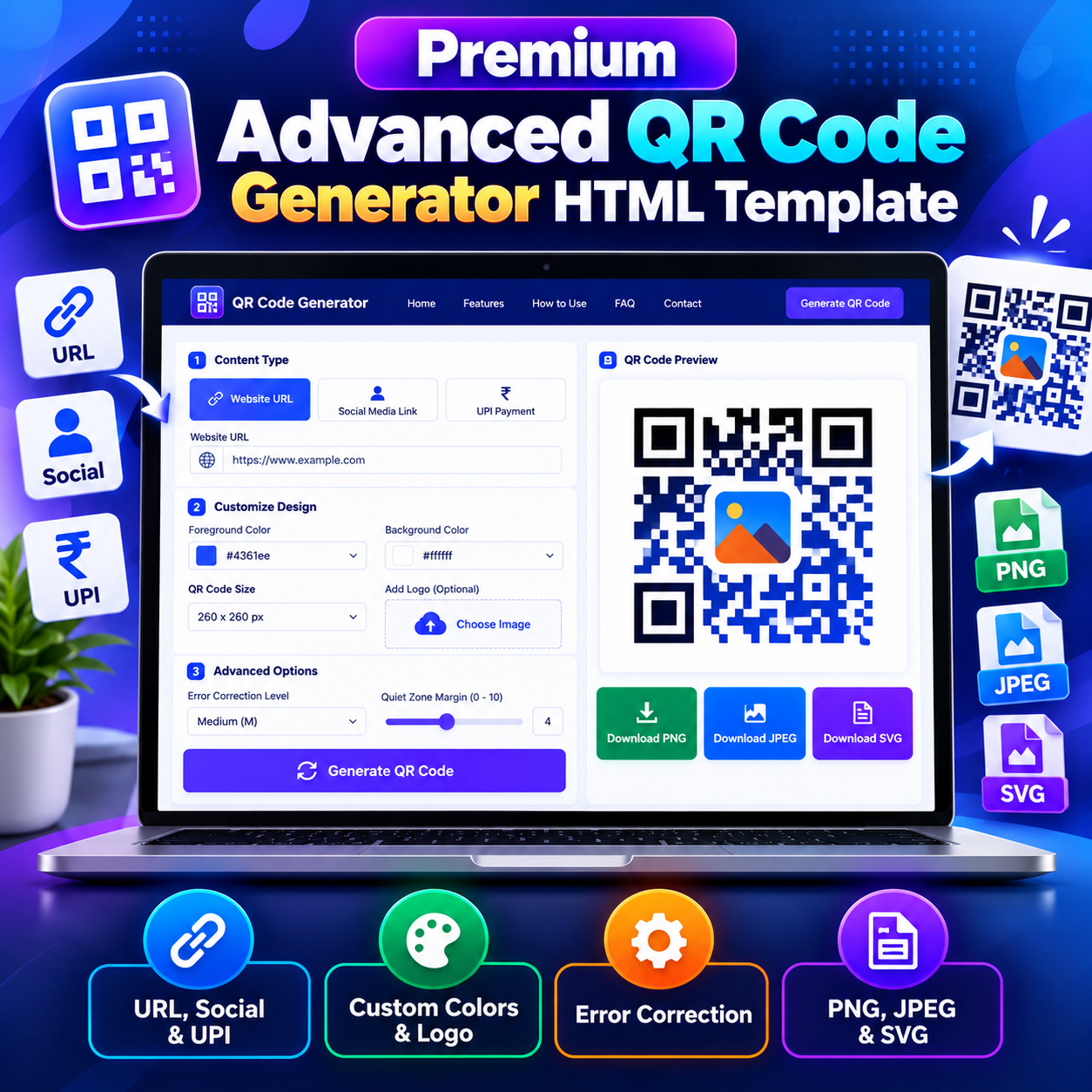
The Advanced QR Code Generator HTML Template combines QR code creation and customization in a clean interface. Users select the type of content they want to encode, enter the relevant details, customize the design, generate a QR code, and download the result. Its three content modes cover website URLs, social media links, and UPI payment information, including an optional payment amount in Indian rupees.
The page includes a navigation header, introductory hero section, QR generator interface, feature cards, usage instructions, audience examples, limitations, frequently asked questions, contact and legal views, and advertisement placeholders. The responsive layout is designed to adapt to desktop, tablet, and mobile screens.
Key Features
- Website URL QR codes: Generate a QR code that encodes a website address.
- Social media QR codes: Encode a social profile or other social media link.
- UPI payment QR codes: Enter a UPI ID and optionally specify an amount in INR.
- Custom foreground and background colors: Choose colors to match a brand or design.
- Logo overlay: Upload an image to place a logo in the center of the generated QR code.
- Optional title: Add a title that can appear with the generated QR code and in supported downloads.
- Adjustable image size: Choose from 180px, 210px, 260px, and 320px QR code dimensions.
- Error correction settings: Select Low, Medium, Quartile, or High error correction.
- Quiet-zone margin control: Adjust the QR code margin from 0 to 10 modules.
- Multiple export formats: Download the generated result in PNG, JPEG, or SVG format.
- Live generation preview: View the generated QR code in the tool interface before downloading.
- UPI guidance: Display a payment-scanning hint when generating a UPI QR code.
- Browser-based processing: QR generation and logo handling are performed in the browser by the included tool.
- Responsive layout: Use the interface across different screen sizes.
- Configurable site information: Update the site name, domain, email, phone number, and address through the included configuration section.
How to Generate a QR Code
- Select Website URL, Social Media Link, or UPI Payment as the content type.
- Enter the website address, social link, or valid UPI ID.
- If using UPI mode, enter a payment amount when required.
- Optionally enter a title to display with the generated QR code.
- Choose the foreground and background colors.
- Select the desired QR code image size.
- Optionally upload a logo image for the center of the QR code.
- Open Advanced Options to configure error correction and quiet-zone margin.
- Click Generate QR Code and review the preview.
- Download the result in PNG, JPEG, or SVG format.
Customization and Error Correction
The color controls let users choose a foreground color for the QR pattern and a background color. The logo upload control accepts image files and places the logo over the central area of the generated code. A background matching the selected QR background color is drawn behind the logo to help preserve contrast.
The image-size selector provides four preset dimensions. The error correction selector offers L, M, Q, and H levels, while the quiet-zone margin control allows a value from 0 to 10 modules. These settings help users adjust the QR code to their design and scanning requirements. However, successful scanning still depends on sufficient contrast, print quality, logo size, and the scanning device or application. Always test the generated code before using it in printed materials or public-facing content.
UPI Payment QR Codes
The UPI mode accepts a UPI ID and an optional amount in Indian rupees. When a positive amount is entered, the generated payment payload includes that amount. If no positive amount is specified, the amount parameter is omitted. The interface also displays a scanning hint referencing commonly used UPI payment applications.
This is a QR code creation utility, not a payment gateway. It does not process transactions, confirm payment status, or connect to a merchant payment dashboard. Users should verify the UPI ID and any amount carefully before distributing the QR code.
Browser Processing and Technical Dependencies
The HTML Template uses the qrcode JavaScript library to generate QR codes and html2canvas to create composite downloads containing the QR code and supported accompanying content. Both libraries are loaded from public content-delivery-network URLs. Consequently, the relevant library resources must load successfully for the complete generation and download workflow to operate.
The core QR generation workflow runs in the browser, and the tool states that the content entered for QR creation is not sent to a server by the generator itself. It does not include a database, saved QR code library, user account system, scan analytics, or a server-side QR management dashboard. Users should download their QR codes to retain copies.
Download Format Details
PNG and JPEG downloads are raster images suitable for common digital uses. When html2canvas is available, these downloads can include the optional title and the UPI scanning hint where applicable. If the library is unavailable, the fallback download exports the QR canvas directly, so the title and hint may not be included.
The SVG export is an SVG wrapper that embeds a PNG raster image. It is not a true vector-path QR code, even though the downloaded file uses the SVG extension. This distinction is important for users who need genuinely scalable vector artwork for professional printing.
Input Restrictions and Important Limitations
- The tool limits encoded content to 300 characters.
- Long content may produce a dense QR code that is harder to scan reliably.
- Only static QR codes are generated; dynamic codes that can be edited after distribution are not included.
- QR codes are not stored in an online account or history dashboard.
- Scan analytics and tracking reports are not included.
- The SVG download embeds raster content rather than creating vector paths.
- Download composition can vary if the html2canvas library does not load.
- UPI mode creates a payment-related QR payload but does not process or verify payments.
- External library availability and browser capabilities can affect generation and export.
Customization and Website Deployment
The source uses HTML for structure, CSS for styling and responsive layouts, and JavaScript for QR generation, input validation, logo overlay, and downloads. Website owners or developers can adapt the page styling, colors, text, navigation, and configurable site details to suit their project. The source also contains advertisement placeholders that can be configured by the website owner.
This portable HTML Template can be adapted for standard web hosting, Blogger, and WordPress, subject to each platform’s editor, embedding, file-upload, theme, and security restrictions. On standard hosting, the HTML file and required assets can be placed in a suitable web directory when supported. Blogger integration may require a supported page, post, or embedding method. WordPress integration may use an appropriate Custom HTML block, page template, or hosted HTML file, depending on the site’s configuration and script permissions. CSS conflicts, navigation behavior, and platform-specific restrictions may require adjustments. This product is not a native Blogger XML theme or a WordPress plugin.
Who Can Use This HTML Template?
This HTML Template may be useful for small businesses, designers, restaurants, event organizers, educators, bloggers, marketers, and individuals who need to create QR codes for websites, social profiles, or UPI payment information. It can also serve as a starting point for web developers who want to customize a browser-based QR generator for a suitable website.
Frequently Asked Questions
Which types of QR codes can I create?
The tool supports website URLs, social media links, and UPI payment information with an optional amount in INR.
Can I customize QR code colors and add a logo?
Yes. You can select foreground and background colors and upload an image to overlay in the center of the QR code.
Which download formats are included?
The interface provides PNG, JPEG, and SVG download options. The SVG export embeds a PNG raster image rather than a true vector path.
Can I change the QR code dimensions?
Yes. Four preset sizes are available: 180px, 210px, 260px, and 320px.
Does this tool create dynamic QR codes?
No. The included generator creates static QR codes and does not provide post-generation editing or scan analytics.
Does the tool store QR codes online?
No. It does not include an online QR code library or account-based storage. Download the generated files to keep copies.
Can I adapt the HTML Template for Blogger or WordPress?
Yes, it can be adapted for Blogger, WordPress, or standard hosting, but the required integration method and adjustments depend on each platform’s restrictions.
Product Summary
Advanced QR Code Generator HTML Template provides a customizable interface for generating QR codes for website links, social media, and UPI payment information. With color selection, logo overlay, adjustable dimensions, error correction, margin controls, preview, and PNG, JPEG, and SVG export options, it offers a practical starting point for a QR generation tool on a suitable website. Review the technical dependencies and limitations, test generated codes for reliable scanning, and adapt the template to the intended publishing platform before deployment.
Related products
-
Sale!

Premium All-in-One Legal Page Generator HTML Template
Original price was: ₹999.00.₹99.00Current price is: ₹99.00. Buy Now -
Sale!
Premium Strong Password Generator HTML Template
Original price was: ₹999.00.₹99.00Current price is: ₹99.00. Buy Now -
Sale!
Premium YouTube Thumbnail Preview Checker HTML Template
Original price was: ₹999.00.₹99.00Current price is: ₹99.00. Buy Now -
Sale!
Premium Chhath Puja Wishes HTML Template 2026
Original price was: ₹999.00.₹99.00Current price is: ₹99.00. Buy Now