Premium Strong Password Generator HTML Template
Original price was: ₹999.00.₹99.00Current price is: ₹99.00.
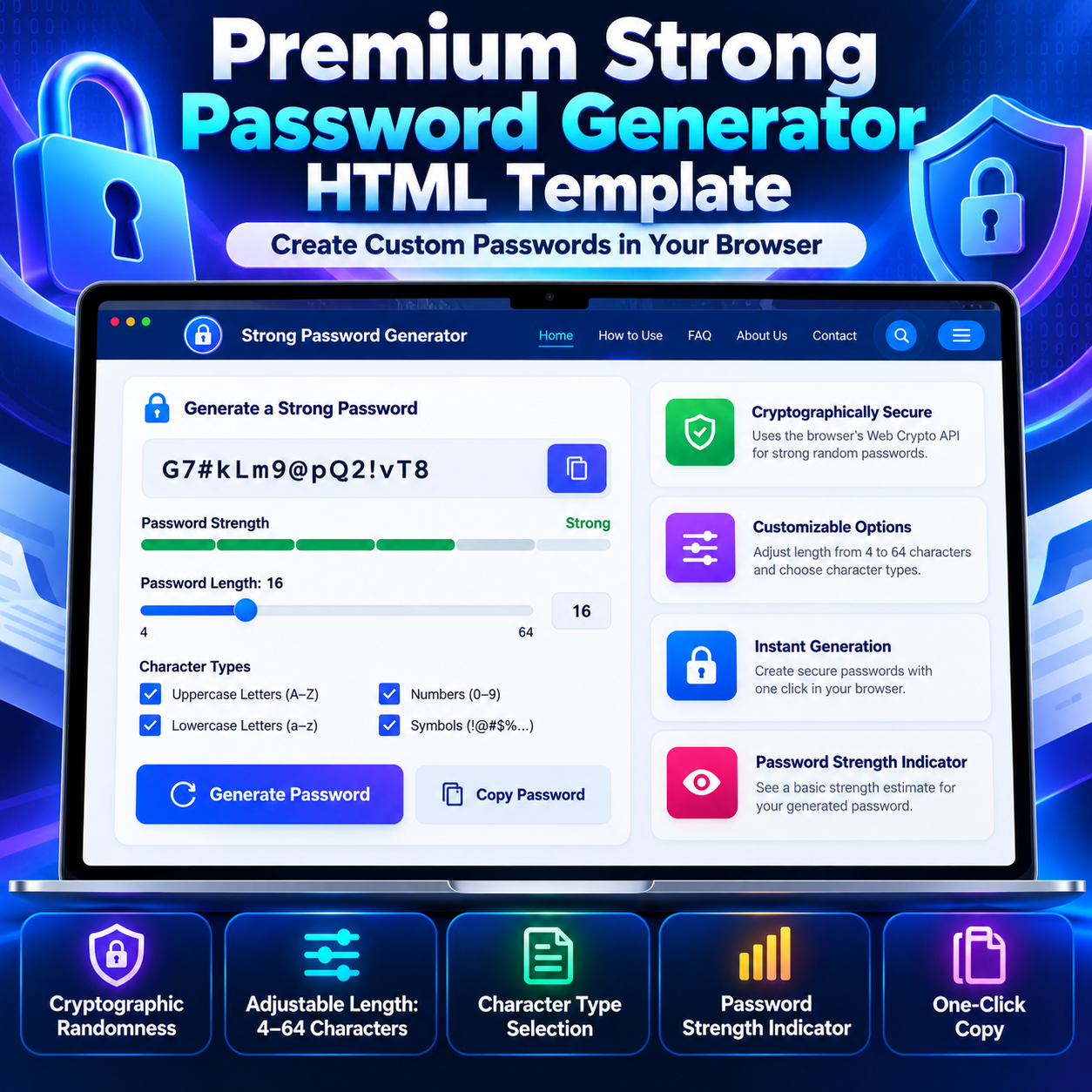
Generate customizable passwords with the Strong Password Generator HTML Template. Adjust the length from 4 to 64 characters, select character types, view a basic strength indicator, and copy the result with one click. This HTML Template uses the browser’s Web Crypto API for password generation.
Compatible Platforms: Blogger, WordPress, and web hosting platforms.
File Format: TXT (HTML, CSS & JavaScript Code)
Limited-time free.
Description
Premium Strong Password Generator HTML Template is a browser-based password generation tool designed to create random passwords with adjustable length and character options. Built with HTML, CSS, and JavaScript, this HTML Template uses the browser’s Web Crypto API to generate passwords with cryptographically strong random values. Users can choose password lengths from 4 to 64 characters, enable uppercase letters, lowercase letters, numbers, and symbols, view a basic strength indicator, and copy generated passwords with one click.
What Is the Strong Password Generator HTML Template?
This HTML Template provides an interactive password generator inside a responsive website interface. Visitors can customize their password settings, generate a new password, view the result, and copy it to the clipboard. The tool operates in the browser without requiring a dedicated backend, database, account registration, or external API for its core password-generation workflow.
The template also includes a homepage, navigation menu, feature sections, usage instructions, a benefits section, limitations, frequently asked questions, and supporting legal-information views. It is designed as a complete standalone HTML page that can be adapted to a suitable website environment.
Key Features
- Cryptographic Randomness: Uses the browser’s crypto.getRandomValues() API to generate random values for password creation.
- Adjustable Password Length: Choose a password length from 4 to 64 characters using a slider.
- Character Type Selection: Enable or disable uppercase letters, lowercase letters, numbers, and symbols independently.
- Password Strength Indicator: Displays a basic Weak, Medium, or Strong indicator based on password length and the selected character pool.
- One-Click Copy: Copy the generated password using either of the two copy controls.
- Character-Type Inclusion: When the password length is sufficient for the selected character types, the generator includes at least one character from each enabled type.
- Responsive Design: Includes desktop and mobile layout adjustments for the navigation, tool, content sections, and footer.
- Mobile Navigation: Provides a collapsible navigation menu for smaller screens.
- Notification Messages: Displays feedback for successful generation, copy actions, and common validation errors.
- FAQ Section: Includes expandable frequently asked questions about password generation, privacy, password length, and usage.
- Legal Information Views: Includes Privacy Policy, Disclaimer, About Us, and Contact Us views.
- Advertisement Placeholders: Contains designated areas for advertisements at the top, hero, below the tool, within the content flow, and near the footer.
- SEO Metadata: Includes title and description metadata, Open Graph fields, Twitter card metadata, a canonical URL, and an SVG favicon.
- Centralized Site Configuration: Provides a JavaScript configuration object for updating the displayed site name, domain, email, phone number, and address.
How to Use the Password Generator
- Choose the password length: Move the slider to select a length between 4 and 64 characters.
- Select character types: Enable the uppercase, lowercase, number, and symbol options required for the password.
- Generate a password: Click the Generate Password button to create a new password using the selected settings.
- Check the strength indicator: Review the displayed strength estimate as a basic guide. It is not a comprehensive password-security assessment.
- Copy the result: Use either copy button to place the generated password on your clipboard.
- Store it securely: Paste the password into a trusted password manager rather than relying on the generator page to save it.
How Password Generation Works
The JavaScript code builds character pools from the options selected by the user. It uses crypto.getRandomValues() to obtain random values and selects characters from the enabled pools. The code also shuffles the resulting character array so the required characters are not left in predictable positions.
If no character type is selected, the tool displays a validation message. If the requested password length is smaller than the number of enabled character types, it asks the user to increase the length. These checks help the generator satisfy its selected character-type requirements.
Password Strength Indicator
The interface includes a visual strength bar with Weak, Medium, and Strong labels. Its estimate uses the password length and the combined size of the enabled character pools. It is intended as a simple indicator, not a full entropy calculator or a guarantee that a password will resist every attack.
Actual account security also depends on password uniqueness, the destination website’s security practices, secure storage, and other account protections. Choose an appropriate password length for the account and use a unique password for every service.
Privacy and Browser-Based Operation
The core generator creates passwords within the browser and does not send generated passwords to a server through the tool’s password-generation code. The template does not include a password-saving feature or a backend database for generated passwords. The password remains visible in the page while displayed, however, and may also be present on the clipboard after copying.
Use the tool only on a device and website environment you trust. Browser extensions, a compromised device, clipboard access, or other software on the device can affect privacy. If advertising code or third-party services are added to the website, those services may have their own data-collection practices. Review the deployed website’s privacy disclosures accordingly.
Website Layout and Customization
The template includes a sticky header, hero section, password-generation interface, feature cards, usage steps, audience-benefit cards, limitations, FAQs, a final call-to-action section, and a multi-column footer. The design uses a blue and purple gradient palette with light content panels, rounded cards, and responsive spacing.
The centralized SITE_CONFIG object allows the site owner to change the default website name, domain, contact email, phone number, and address. The JavaScript applies these values to relevant page elements and metadata. Before publishing, replace the example domain and contact details with accurate information.
Advertisement Placement Areas
The source includes named advertisement placeholders near the top of the page, within the hero area, below the password tool, in the content area, and near the footer. These are placement areas containing placeholder text, not integrated advertising services. Add your own approved advertising code where appropriate and verify the layout after integration.
Platform Compatibility
Blogger
The HTML Template can be adapted for Blogger using a suitable page or post HTML-editing method where supported. Blogger may restrict scripts, styles, or complete document structures depending on how the code is inserted. A full standalone page may require restructuring or additional adjustments before it works as intended.
WordPress
The template can be adapted for WordPress through a suitable custom page template, Custom HTML block, or hosting-file method, depending on your setup. WordPress editors, security settings, and themes may restrict JavaScript or alter the layout. This product is an HTML Template, not a native WordPress plugin.
Standard Web Hosting
For standard web hosting, upload the HTML file to an appropriate directory when the hosting environment supports standalone HTML pages. Check file permissions, the page URL, metadata, and any modified configuration values before publishing.
Technical Requirements
- A modern browser with JavaScript enabled.
- Support for the Web Crypto API through crypto.getRandomValues().
- HTML, CSS, and JavaScript support in the target hosting environment.
- Clipboard API support or the template’s legacy copy fallback.
- A suitable secure browser context for APIs that require it; clipboard functionality may vary by browser and deployment environment.
- Manual customization of example contact information, domain metadata, and advertisement placeholders before publication.
Important Limitations
The strength indicator is an approximate guide, not a comprehensive security audit. The tool does not save generated passwords, synchronize them across devices, check breached-password databases, or replace a password manager. The generated password is visible in the page while in use, so avoid using the tool on untrusted devices.
The source also includes example website details and general legal-information content. Review the Privacy Policy, Disclaimer, About Us, and Contact Us views before publishing them. Update all contact details and ensure every statement reflects the actual website. Platform integration, advertisement installation, and additional customization may require technical adjustments.
Frequently Asked Questions
What password lengths are supported?
The length slider supports values from 4 to 64 characters.
Which character types can I select?
You can independently enable uppercase letters, lowercase letters, numbers, and symbols.
How are passwords generated?
The generator uses the browser’s crypto.getRandomValues() API and selects characters from the enabled character pools.
Does the tool upload generated passwords?
The password-generation code operates in the browser and does not send generated passwords to a server. Keep in mind that the security of the device and browser environment also matters.
Does the tool save passwords?
No. The template does not include a feature to save generated passwords. Copy the result to a trusted password manager before leaving the page.
Is the strength indicator exact?
No. It is a rough estimate based on password length and the size of the selected character pools.
Can this template be used on Blogger or WordPress?
It can be adapted for supported Blogger and WordPress publishing methods, subject to script restrictions, editor behavior, theme styling, and required code adjustments.
Can I add advertisements?
The template includes advertisement placeholder areas. Advertising code must be added separately, and the page should be tested after integration.
Who Can Use This HTML Template?
This template can serve website owners who want to offer a browser-based password generator to visitors. Potential audiences include everyday users, professionals, developers, IT administrators, students, and people who prefer a local password-generation workflow.
Premium Strong Password Generator HTML Template combines customizable password length, selectable character types, cryptographic random generation, a basic strength indicator, copy controls, responsive page sections, and configurable website details in a standalone HTML interface. Review the technical requirements, replace example configuration values, and adapt the code to your target platform before publishing.
Related products
-
Sale!

Premium Diwali Wishes HTML Template 2026
Original price was: ₹999.00.₹99.00Current price is: ₹99.00. Buy Now -
Sale!
Premium Blogger Sitemap Generator HTML Template
Original price was: ₹999.00.₹99.00Current price is: ₹99.00. Buy Now -
Sale!
Premium Google Search Snippet Preview HTML Template
Original price was: ₹999.00.₹99.00Current price is: ₹99.00. Buy Now -
Sale!
Premium YouTube Thumbnail Preview Checker HTML Template
Original price was: ₹999.00.₹99.00Current price is: ₹99.00. Buy Now