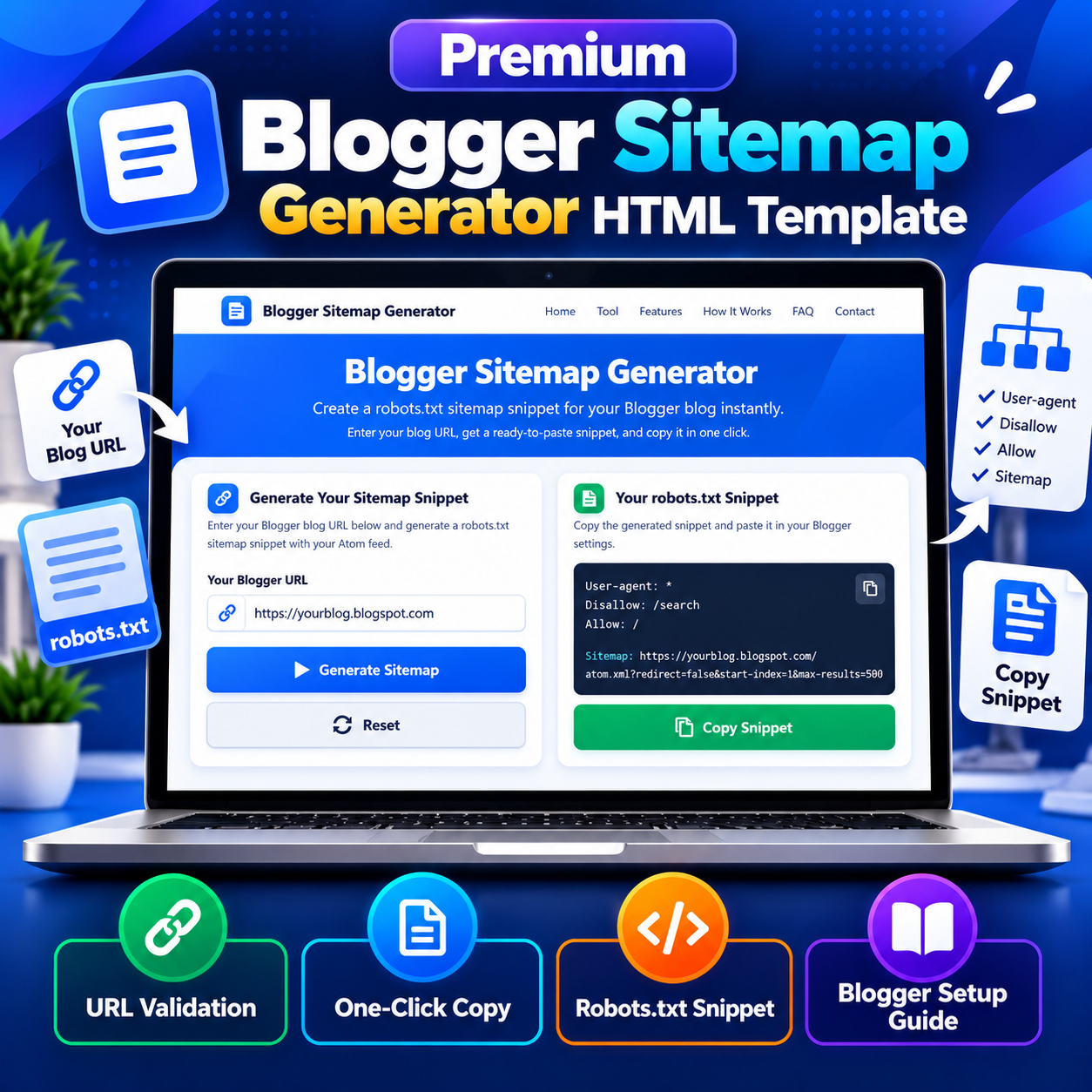
Premium Blogger Sitemap Generator HTML Template
Original price was: ₹999.00.₹99.00Current price is: ₹99.00.
Generate a Blogger robots.txt sitemap snippet with this Blogger Sitemap Generator HTML Template. Includes URL validation, one-click copying, reset controls, and step-by-step Blogger setup instructions.
Compatible Platforms: Blogger, WordPress, and web hosting platforms.
File Format: TXT (HTML, CSS & JavaScript Code)
Limited-time free.
Description
Blogger Sitemap Generator HTML Template is a browser-based SEO utility designed to help Blogger website owners generate a ready-to-paste robots.txt sitemap snippet. Users enter their Blogger blog URL, generate the snippet, and copy it to the clipboard for use in Blogger’s custom robots.txt settings. Built with HTML, CSS, and JavaScript, this responsive HTML Template includes URL validation, automatic snippet generation, one-click copying, a reset option, usage instructions, and supporting SEO information.
Product Overview
Managing a Blogger blog’s robots.txt configuration can be confusing for beginners who are unfamiliar with sitemap references, Atom feeds, and crawler directives. This Blogger Sitemap Generator HTML Template simplifies one specific task by constructing a robots.txt snippet from the blog URL entered by the user.
The generated snippet includes a User-agent directive, a Disallow rule for search pages, an Allow rule for the root path, and a Sitemap line pointing to the blog’s Atom feed. Users can review the generated result and copy it before pasting it into Blogger’s custom robots.txt setting.
The template also includes a responsive navigation header, a blue gradient hero section, the sitemap generation tool, feature cards, step-by-step instructions, an explanation of why sitemap references matter, audience information, limitations, frequently asked questions, legal-information views, and advertisement placeholders.
Key Features
- Blogger sitemap snippet generation: Build a robots.txt snippet using the Blogger URL entered by the user.
- Atom feed sitemap reference: Generate a Sitemap line that points to the blog’s Atom feed.
- URL validation: Check that the entered URL includes an HTTP or HTTPS protocol and has a valid URL structure.
- Automatic trailing-slash removal: Remove trailing slashes before constructing the sitemap URL.
- One-click copy: Copy the generated robots.txt snippet to the clipboard using the Copy Snippet button.
- Clipboard fallback: Attempt an alternative copy method if the modern clipboard API is unavailable or fails.
- Reset functionality: Clear the entered URL and generated result to start again.
- Enter-key support: Generate the snippet by pressing Enter while using the URL input field.
- Step-by-step instructions: Explain how to generate, copy, and paste the snippet into Blogger settings.
- Responsive interface: Adapt the navigation, tool, feature cards, buttons, and footer for smaller screens.
- Browser-based processing: Validate the URL and construct the snippet locally using JavaScript.
- Status notifications: Display messages for successful generation, copying, and validation errors.
- Configurable site information: Customize the displayed site name, domain, email address, phone number, and address using the SITE_CONFIG object.
- SEO educational content: Include explanatory content about sitemap references, crawling, indexing, and the tool’s limitations.
- Advertisement placeholders: Provide designated page locations where the website owner can configure advertising code.
How the Blogger Sitemap Generator Works
The tool uses the Blogger URL supplied by the user to construct a robots.txt snippet. It does not automatically visit the blog or check whether the feed is accessible. Instead, it validates the URL’s format and builds the output using a predefined Atom feed URL pattern.
- Enter the full Blogger blog URL, including https://.
- Click Generate Sitemap to validate the input.
- Review the generated robots.txt snippet in the result area.
- Click Copy Snippet to copy the result to the clipboard.
- Open Blogger and navigate to Settings, then Crawlers and indexing.
- Enable the custom robots.txt option if appropriate for your blog.
- Paste the generated snippet and save your settings.
- Check the resulting robots.txt configuration to confirm that it is publicly accessible and correct.
URL Validation and Error Handling
The generator trims unnecessary whitespace and removes trailing slashes from the submitted URL. It checks for an HTTP or HTTPS prefix and attempts to parse the value as a valid URL. If the input is empty, lacks a protocol, or cannot be parsed, the tool displays an error notification instead of generating the result.
These checks validate the URL’s format, not the ownership or existence of a Blogger blog. The tool does not confirm that the address belongs to Blogger, that the Atom feed can be accessed, or that the generated snippet is accepted by search engines. Users should verify the entered URL before copying the result.
Browser-Based Processing and Privacy
The URL validation and snippet construction take place in the browser using JavaScript. The included tool does not upload the entered Blogger URL or generated snippet to a dedicated processing server. It does not require a database, user account, or external sitemap-generation API.
The clipboard functionality uses the browser clipboard API when available and includes an alternative copy method. Browser permissions and security restrictions can affect clipboard access, so manual copying may occasionally be necessary.
Responsive Design and Page Sections
The template uses a blue and white visual design with a gradient hero section, a clearly separated tool interface, feature cards, numbered instruction cards, FAQ accordions, and a dark footer. Its responsive CSS includes adjustments for mobile navigation, typography, spacing, buttons, and footer columns.
The complete page also includes About Us, Contact Us, Privacy Policy, and Disclaimer views. The contact information and site identity are populated through a centralized SITE_CONFIG object. Replace the demonstration values with your actual website details before publishing.
Customization and Deployment
The template is built with HTML for structure, CSS for styling, and JavaScript for the generator’s functionality. Developers can customize the page colors, headings, explanatory content, navigation labels, site details, and layout to match a website’s branding.
The source includes advertisement placeholders in the top, hero, tool-bottom, content, and footer areas. These are placement markers, not active advertising integrations. Website owners must configure their own advertising code and ensure that any inserted scripts work correctly with the template.
This portable HTML Template can be adapted for standard web hosting, Blogger, and WordPress, subject to platform-specific editing, file-upload, security, and script restrictions. On standard hosting, it can be placed in a suitable web directory. On Blogger or WordPress, the code may require a supported embedding method or page integration and adjustments to avoid conflicts with existing themes. It is not a native Blogger XML theme or a WordPress plugin.
Important Limitations
- The tool generates a robots.txt snippet, not a standalone XML sitemap file.
- The generated Sitemap directive references the Blogger Atom feed.
- The tool is specifically designed for Blogger’s Atom feed URL pattern, not general WordPress or other platform sitemap formats.
- The tool does not fetch the entered blog URL or verify whether the Atom feed is reachable.
- The start-index and max-results parameters are fixed at 1 and 500.
- Blogs with more than 500 posts may need additional sitemap lines for other feed ranges.
- Search engines decide which URLs to crawl and index; the generated snippet does not guarantee indexing or improved rankings.
- The user must manually paste and save the snippet in Blogger settings.
- Clipboard access depends on browser capabilities and permissions.
Who Can Use This HTML Template?
This HTML Template may be useful for Blogger beginners, bloggers, SEO practitioners, website owners, digital marketing agencies, students, and developers who want a simple utility for generating a Blogger robots.txt sitemap snippet. It can also serve as an educational example of how URL validation, Atom feed references, and crawler directives can be presented in a browser-based tool.
Frequently Asked Questions
What does this Blogger Sitemap Generator create?
It creates a robots.txt snippet containing crawler directives and a Sitemap line pointing to the Blogger blog’s Atom feed.
Does it generate an XML sitemap file?
No. It generates a text snippet for robots.txt. The Sitemap directive references the blog’s Atom feed.
Does the tool automatically update Blogger settings?
No. Users must copy the generated snippet and paste it into Blogger’s custom robots.txt settings themselves.
Is the entered URL sent to a server?
The included generator validates the URL and constructs the snippet in the browser. It does not send the entered URL to a dedicated generation server.
Does this tool guarantee Google indexing?
No. A sitemap reference can help search engines discover a feed, but indexing and rankings depend on search engine systems and their own criteria.
Can the tool handle blogs with more than 500 posts?
The generated sitemap line uses start-index=1 and max-results=500. Blogs with more than 500 posts may require additional feed references, which the tool does not generate automatically.
Can I use this generator for WordPress?
The generator’s output is specific to Blogger’s Atom feed format. WordPress sites use different sitemap arrangements, so this tool is not a general-purpose WordPress sitemap generator.
Can I customize the template?
Yes. The HTML, CSS, and JavaScript source can be adapted to customize the design, page content, site configuration, and other supported interface elements.
Product Summary
Blogger Sitemap Generator HTML Template provides a focused browser-based solution for creating a robots.txt sitemap snippet for Blogger blogs. Its URL validation, automatic snippet construction, copy-to-clipboard functionality, reset control, responsive layout, instructions, FAQs, and configurable site information make it a practical starting point for a Blogger SEO utility page. Review the fixed feed parameters, verify the generated URL, and test the final robots.txt configuration before relying on it.
Related products
-
Sale!

Premium Smart Word Counter HTML Template
Original price was: ₹999.00.₹99.00Current price is: ₹99.00. Buy Now -
Sale!
Premium YouTube Thumbnail Preview Checker HTML Template
Original price was: ₹999.00.₹99.00Current price is: ₹99.00. Buy Now -
Sale!
Premium All-in-One Legal Page Generator HTML Template
Original price was: ₹999.00.₹99.00Current price is: ₹99.00. Buy Now -
Sale!
Premium Invoice Generator HTML Template
Original price was: ₹999.00.₹99.00Current price is: ₹99.00. Buy Now