Premium Invoice Generator HTML Template
Original price was: ₹999.00.₹99.00Current price is: ₹99.00.
Create professional invoices with this Invoice Generator HTML Template. Includes itemized billing, tax and discount calculations, PDF downloads, and browser printing.
Compatible Platforms: Blogger, WordPress, and web hosting platforms.
File Format: TXT (HTML, CSS & JavaScript Code)
Limited-time free.
Description
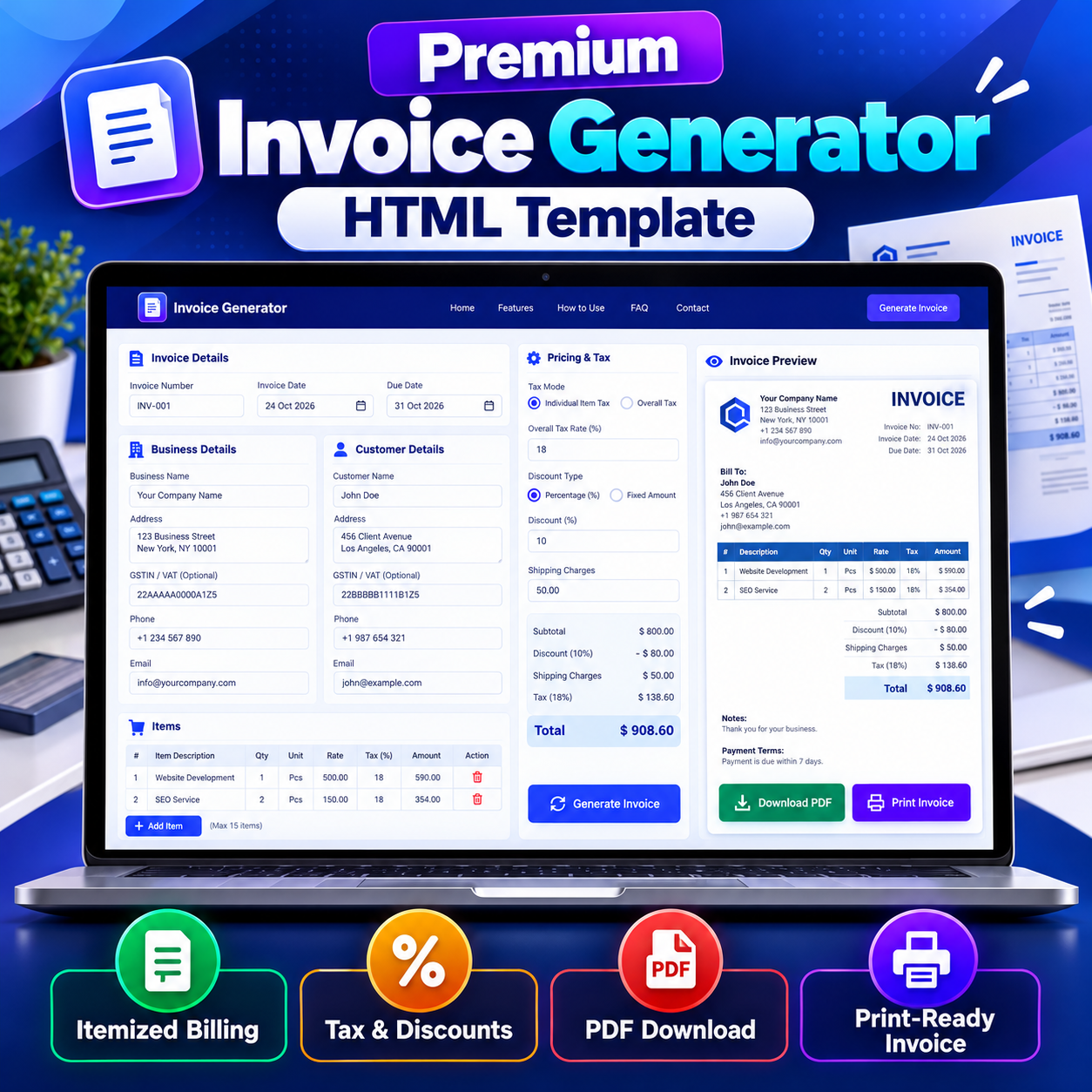
Invoice Generator HTML Template is a browser-based billing tool designed to help freelancers, small businesses, service providers, and online sellers create professional invoices. This responsive HTML Template includes business and customer details, itemized billing, tax calculations, discount options, shipping charges, a live invoice preview, PDF downloading, and browser-based printing. Built with HTML, CSS, and JavaScript, it provides a practical starting point for adding an invoice creation tool to a suitable website.
Product Overview
The Invoice Generator HTML Template provides a structured interface for entering invoice information and producing a clean, printable invoice. Users can enter their business details, customer information, invoice number, invoice date, due date, products or services, pricing, applicable tax, shipping charges, discounts, notes, and payment terms. After completing the form, users can generate an invoice preview and download it as a PDF or print it directly from the browser.
The template is designed around a straightforward workflow, making it useful for websites that want to offer an invoice utility without requiring a dedicated server-side invoicing application. The layout includes a navigation header, introductory section, invoice builder, feature cards, usage instructions, audience information, limitations, FAQs, legal-information views, and footer.
Key Features
- Invoice information: Enter an invoice number, invoice date, and due date.
- Business details: Add a business or company name, address, GSTIN or VAT number, phone number, and email address.
- Customer details: Enter customer contact information, address, and optional GSTIN details.
- Itemized billing: Add up to 15 invoice items with descriptions, quantities, units, rates, and tax percentages.
- Flexible tax options: Apply tax individually to line items or select an overall tax rate.
- Discount controls: Choose a percentage discount or a fixed-amount discount.
- Shipping charges: Include shipping charges in the invoice calculations.
- Invoice preview: Generate and review a formatted invoice before printing or downloading.
- PDF export: Create a PDF using the included jsPDF and html2canvas libraries.
- Print-ready layout: Use the dedicated A4 print stylesheet to print the invoice from the browser.
- Duplicate invoice: Use the duplicate action available with the invoice preview.
- Notes and payment terms: Add a message, notes, or payment terms to the invoice.
- Browser-based calculations: Invoice calculations take place locally in the browser.
- Responsive design: The interface adapts to desktop, tablet, and mobile screen sizes.
- Centralized site settings: Update the site name, domain, email, phone number, and address through the included configuration object.
How to Use the Invoice Generator
- Open the invoice tool and enter the invoice number, invoice date, and due date.
- Fill in your business or company information.
- Enter the customer’s name, address, and relevant contact details.
- Add products or services using the itemized billing section.
- Enter quantities, units, rates, and applicable item tax percentages.
- Select the tax mode and configure the overall tax rate when applicable.
- Apply a percentage or fixed discount and add shipping charges if required.
- Enter notes and payment terms.
- Click Generate Invoice to display the invoice preview.
- Review the information, then choose Download PDF, Print Invoice, or Duplicate.
Tax, Discounts, and Pricing
The pricing section supports two tax modes: tax per item and overall tax. In item-level mode, individual line items can have their own tax percentages. In overall-tax mode, the user can enter one tax rate for the invoice subtotal. The template also provides percentage and fixed-amount discount options, along with a shipping-charge field.
Users should review the resulting calculations before sending an invoice. Tax rules, rounding requirements, and legally required invoice fields differ by country and business type. The template is a general invoice creation utility, not a substitute for professional accounting advice or jurisdiction-specific tax software.
PDF Download and Printing
The template includes PDF export through jsPDF and html2canvas, which are loaded from public content-delivery-network URLs. The invoice preview is captured and inserted into an A4 PDF document. Users can also print the invoice directly from the browser using the included print stylesheet.
PDF rendering can vary slightly between browsers. Very long invoices may produce a scaled-down or multi-page document. The layout is designed around a maximum of 15 line items to help maintain a clean invoice layout, so users should review the final PDF before sharing it with a customer.
Browser Processing and Data Handling
The invoice calculations and PDF generation are performed in the browser. The template states that the business details, customer information, line items, and invoice content are not uploaded to a server by the tool. It does not include a backend database or a server-side invoice storage system.
The invoice number sequence is stored locally in the browser using localStorage. This helps the sequence persist between sessions, but it can reset if browser data is cleared. The tool does not retain a complete invoice archive. Users should download or print each invoice they need to keep.
Customization Options
The HTML Template uses HTML for structure, CSS for styling, and JavaScript for calculations, navigation, invoice generation, and export actions. Developers can adapt the colors, typography, layout, labels, and page content to fit a website’s visual identity.
The included SITE_CONFIG object provides settings for the site name, domain, email, phone number, and address. Replace the demonstration values with the appropriate information before publishing. Advertisement placeholders are also included at several page locations, allowing site owners to decide whether and how to insert their own advertising code.
Platform Compatibility
This portable Invoice Generator HTML Template can be adapted for standard web hosting, Blogger, or WordPress, subject to each platform’s editor, file-upload, script, security, and theme restrictions.
On standard hosting, the HTML file and any required assets can be placed in a suitable web directory. For Blogger, the code may need to be adapted for a supported page, post, or embedding method; a complete standalone HTML document may not work unchanged in every Blogger editor. For WordPress, integration may involve a suitable Custom HTML block, a page template, or a separately hosted HTML file. Script permissions, theme styles, and page structure may require adjustments. This product is a portable HTML Template, not a native Blogger XML theme or a WordPress plugin.
Important Limitations
- A maximum of 15 line items is supported per invoice.
- The built-in layout does not support multiple currencies or multilingual invoices as dedicated features.
- Currency conversion is not included.
- The invoice number sequence is stored in localStorage and may reset when browser data is cleared.
- Complete invoices are not saved to a server or maintained in an invoice-history dashboard.
- Users must download or print invoices to keep their own records.
- PDF output can vary slightly by browser, and long invoices may be scaled or span multiple pages.
- External jsPDF and html2canvas libraries are loaded from a public CDN, so PDF export depends on those resources being accessible.
- Platform-specific adaptation may be necessary before publishing.
Who Can Use This HTML Template?
This HTML Template may be useful for freelancers who bill clients, small businesses that sell products or services, consultants, service providers, e-commerce sellers, and website owners who want to offer an invoice creation utility. It can also be used by web developers as a starting point for a customized browser-based billing interface.
Frequently Asked Questions
Can I download invoices as PDF files?
Yes. The template includes a PDF download action powered by jsPDF and html2canvas.
Can I print an invoice directly?
Yes. The invoice preview includes a Print Invoice action and a dedicated A4 print stylesheet.
How many items can I add to one invoice?
The included interface supports up to 15 line items per invoice.
Can I apply tax and discounts?
Yes. You can use item-level tax or an overall tax rate, plus a percentage or fixed-amount discount.
Does the tool save invoices online?
No. The tool does not include server-side invoice storage. Download or print each invoice to keep a copy.
Is customer information uploaded to a server by the tool?
The included invoice workflow processes invoice information in the browser and does not upload that information to a server. The invoice number sequence is stored locally in browser localStorage.
Can I use the template on Blogger or WordPress?
It can be adapted for Blogger, WordPress, and standard hosting, but the integration method depends on the platform’s restrictions and the adjustments required.
Does it support automatic currency conversion?
No. Currency conversion and dedicated multi-currency invoice layouts are not included.
Product Summary
Invoice Generator HTML Template combines itemized billing, tax and discount calculations, shipping charges, invoice preview, PDF export, and printing in a responsive browser-based interface. Its configurable site details and portable HTML, CSS, and JavaScript structure make it a practical starting point for website owners and developers who want to offer invoice creation functionality. Review the limitations, verify important invoice details, and adapt the template to the target platform before publishing.
Related products
-
Sale!

Premium Chhath Puja Wishes HTML Template 2026
Original price was: ₹999.00.₹99.00Current price is: ₹99.00. Buy Now -
Sale!
Premium Text to Speech HTML Template
Original price was: ₹999.00.₹99.00Current price is: ₹99.00. Buy Now -
Sale!
Premium Strong Password Generator HTML Template
Original price was: ₹999.00.₹99.00Current price is: ₹99.00. Buy Now -
Sale!
Premium YouTube Thumbnail Preview Checker HTML Template
Original price was: ₹999.00.₹99.00Current price is: ₹99.00. Buy Now