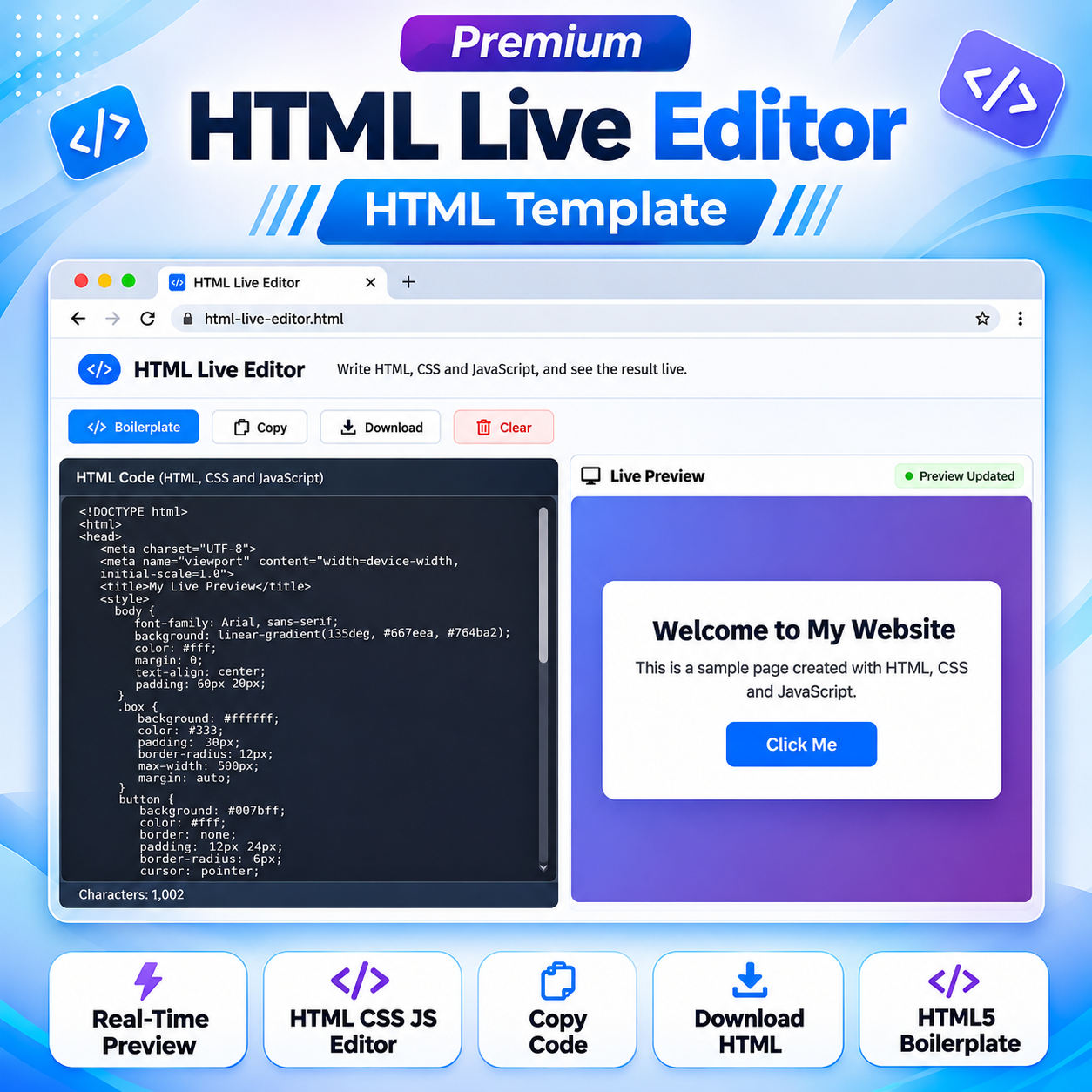
Premium HTML Live Editor HTML Template
Original price was: ₹999.00.₹400.00Current price is: ₹400.00.
A browser-based HTML Live Editor HTML Template for writing HTML, CSS, and JavaScript, previewing changes live, switching themes, and copying or downloading your code.
Compatible Platforms: Blogger, WordPress, And Web Hosting Platforms.
File Format: Single TXT File (Editable HTML, CSS & JavaScript Code – No Encrypted Scripts).
Technology: No API & No Backend Required.
Installation: One-Click Setup.
Demo: Live Preview.
Payment: One-Time Payment – Lifetime Access.
Guarantee: Money-Back Refund Policy.
Delivery: Download Link After Purchase.
Support: Contact Us on WhatsApp.
Description
HTML Template Setup Guide for Blogger, WordPress & Web Hosting | Complete Tutorial
Learn how to set up and use HTML Templates on Blogger, WordPress, and Web Hosting Platforms. Follow our step-by-step guide to upload, configure, and customize your templates easily.
🎥 Video Resources & Links
📚 Free Blogger Full Course & WhatsApp Contact
Visit Free WordPress Full Course
📚 Free WordPress Full Course & WhatsApp Contact
Visit Free WordPress Full Course
🔥 Free Domain + Web Hosting (Hostinger)
Get Domain + Web Hosting From Hostinger
🎁 Hostinger Coupon Code: RESEARCHTECHNEWS
Use the coupon code RESEARCHTECHNEWS to get 10% OFF where applicable.
HTML Live Editor HTML Template is a browser-based coding playground that lets users write HTML, CSS, and JavaScript in one editor and view the rendered result in a separate live preview. This Premium HTML Template provides a straightforward workspace for learning front-end development, testing markup, experimenting with page layouts, and demonstrating how website code works. Its editing controls and preview area bring common coding tasks together in one accessible browser interface.
Explore the HTML Live Editor
The main workspace is divided into a code input area and a live preview area. Users can enter a complete HTML document in the editor, including CSS inside style tags and JavaScript inside script tags. The preview displays the rendered webpage, helping users see how their code affects the page. When the code is changed, the preview refreshes automatically after a short delay.
The editor is designed around a simple text input rather than a complex development environment. A character counter displays the current length of the entered code. A preview status indicator helps users see when the preview has been updated. These elements make the editing workflow easier to follow while working with HTML, CSS, and JavaScript.
Useful editing controls
The toolbar includes several controls for everyday editing tasks:
- HTML5 Boilerplate: Inserts a starter HTML document with a doctype, document structure, viewport metadata, a sample title, basic styling, and sample page content.
- Copy Code: Copies the current editor contents to the clipboard using browser clipboard functionality when available, with a fallback copy method.
- Download HTML: Creates an HTML file named index.html containing the current editor contents, allowing users to save their work locally.
- Clear: Removes the current editor contents and refreshes the preview.
- Character Counter: Displays the current character count of the code entered in the editor.
- Live Preview: Displays the rendered output of the code entered in the editor.
Browser-based coding and preview
The HTML Live Editor HTML Template uses the browser’s document-rendering capabilities to display the preview. The entered document is loaded into a sandboxed iframe, with script execution permitted for previewing JavaScript included in the user’s code. Browser security restrictions still apply, so certain actions that require additional permissions or access beyond the preview frame may not work in the same way as they would on a fully hosted website.
The core editing and preview workflow runs in the browser. The supplied implementation does not include an application API connection, database integration, or server-side code-processing component. The editor content is not saved automatically between visits, so users should copy or download their work before leaving or refreshing the page. External resources referenced inside code entered by the user, such as remote images, fonts, or scripts, may require an internet connection.
Responsive interface
The interface is designed to adapt to different screen sizes. Its layout includes a navigation area, toolbar, editor section, and preview section. Flexible layout rules help the workspace fit different display widths, while the mobile navigation behavior helps keep the interface usable on smaller screens. The exact experience may vary according to the device, browser, and the way the template is embedded or deployed.
The editor uses a standard text area. It does not provide syntax highlighting, automatic code completion, debugging tools, multiple independent HTML/CSS/JavaScript editing panels, or project file management. The product is intended as a focused browser-based editor and preview utility rather than a complete integrated development environment.
Who can use this HTML Template?
- Beginners: Practise HTML tags, attributes, CSS rules, and basic JavaScript while observing the rendered output.
- Students: Experiment with small coding examples and understand how webpage structure and styling work together.
- Teachers: Demonstrate basic front-end concepts and show the relationship between code and its rendered result.
- Web designers: Try simple page layouts and visual ideas before incorporating them into a larger website project.
- Developers: Test small HTML examples or front-end snippets without opening a complete development project.
How to use the HTML Live Editor
- Open the page containing the HTML Live Editor in a modern web browser.
- Enter or paste your HTML document into the code input area.
- Add CSS inside style tags and JavaScript inside script tags when required.
- View the rendered result in the Live Preview area.
- Use the HTML5 Boilerplate control when you need the included starter document.
- Use Copy Code to copy your current work or Download HTML to save it as index.html.
- Use Clear when you want to remove the current code and begin again.
- Save your work before leaving the page because editor contents are not automatically retained between visits.
Customization options
The supplied template contains HTML, CSS, and JavaScript in a single document. Website owners and developers can adapt the page title, visible text, site information, contact details, layout, colors, navigation labels, and other content by editing the relevant source sections. The source includes a SITE_CONFIG object containing site-related details such as the displayed site name, domain, email, phone number, and address. Review and replace the example values with your own accurate information before publishing.
The page also contains advertising placement containers with placeholder text. These containers represent layout locations and do not mean that an advertising network account or active advertising script is already configured. If you want to display advertisements, add the relevant advertising code separately and test it according to the advertising provider’s requirements.
Blogger, WordPress, and web hosting adaptability
This product is a portable HTML, CSS, and JavaScript website template. It is not a native Blogger XML theme or a WordPress plugin. On a standard web-hosting platform, the HTML file and any required assets can be uploaded to a suitable web directory, provided the hosting environment supports the files and scripts used by the template.
For Blogger, the template may need to be adapted for a supported page, post, or embedding area. Blogger may sanitize, rearrange, or restrict parts of a complete HTML document and its scripts. Therefore, pasting the entire standalone document into every Blogger editor should not be assumed to work unchanged. The page structure, styles, and script placement may need adjustment.
For WordPress, the template may be integrated through a suitable Custom HTML block, page or template method, or a separately hosted HTML file. The appropriate method depends on the WordPress setup, theme, permissions, and whether scripts and styles are permitted in the selected location. Existing website styles may conflict with the template’s CSS, and script restrictions may require changes. These are practical adaptation methods, not a guarantee of automatic installation or identical behavior on every WordPress website.
Technical requirements and limitations
- A modern browser supporting standard HTML, CSS, JavaScript, iframe srcdoc, and browser file-download behavior is recommended.
- The supplied implementation does not include an application API, database, or server-side code-processing component.
- The core editor and preview workflow runs in the browser after the page has loaded.
- Editor contents are not automatically saved between visits. Users should download or copy their work before leaving the page.
- The preview uses a sandboxed iframe. Browser security rules and iframe restrictions may affect certain scripts or browser features.
- External images, fonts, scripts, and other remote resources included in user-entered code may require internet connectivity.
- The editor is a standard text area and does not include syntax highlighting, code completion, debugging tools, or project file management.
- Large or complex documents may affect preview responsiveness depending on the device and browser.
- Example site details and advertising placeholders should be reviewed and customized before public deployment.
Frequently asked questions
Does the editor support HTML, CSS, and JavaScript?
Yes. Users can write HTML in the editor, include CSS inside style tags, and include JavaScript inside script tags. The preview frame permits script execution subject to browser and sandbox restrictions.
Does the preview update automatically?
Yes. The page listens for changes in the editor and refreshes the preview after a short delay. The character counter and preview status are also updated as part of the editing workflow.
Can I copy my code?
Yes. The Copy Code control attempts to copy the current editor contents using browser clipboard functionality, with a fallback method included in the source.
Can I download my HTML document?
Yes. The Download HTML control creates an index.html file containing the current editor contents so that you can save it locally.
Does the editor automatically save my work?
No. The supplied implementation does not automatically retain editor contents between visits. Copy or download your code before closing or refreshing the page.
Is this a complete professional development environment?
No. It is a focused browser-based HTML, CSS, and JavaScript editing and preview tool. It does not include advanced IDE features such as syntax highlighting, automatic code completion, debugging tools, or project file management.
Can I adapt this template for my website?
Yes. The HTML, CSS, JavaScript, page content, and included site configuration can be adapted. The integration process depends on the hosting platform and its restrictions.
Premium HTML Live Editor HTML Template provides a practical starting point for publishing a browser-based coding playground. Customize the included site information, review the placeholder content, and test the final page in your intended deployment environment before making it publicly available.
Related products
-
Sale!

Premium Smart Word Counter HTML Template
Original price was: ₹999.00.₹400.00Current price is: ₹400.00. Add to cart -
Sale!
Premium Chhath Puja Wishes HTML Template 2026
Original price was: ₹999.00.₹300.00Current price is: ₹300.00. Add to cart -
Sale!
Premium Advanced QR Code Generator HTML Template
Original price was: ₹999.00.₹400.00Current price is: ₹400.00. Add to cart -
Sale!
Premium Dhanteras Wishes HTML Template 2027
Original price was: ₹999.00.₹300.00Current price is: ₹300.00. Add to cart -
Sale!
Premium Invoice Generator HTML Template
Original price was: ₹999.00.₹400.00Current price is: ₹400.00. Add to cart -
Sale!
Premium Google Search Snippet Preview HTML Template
Original price was: ₹999.00.₹400.00Current price is: ₹400.00. Add to cart -
Sale!
Premium Blogger Sitemap Generator HTML Template
Original price was: ₹999.00.₹400.00Current price is: ₹400.00. Add to cart -
Sale!
Premium Strong Password Generator HTML Template
Original price was: ₹999.00.₹400.00Current price is: ₹400.00. Add to cart