Premium Galaxy Pro Blogger Template
Original price was: ₹999.00.₹399.00Current price is: ₹399.00.
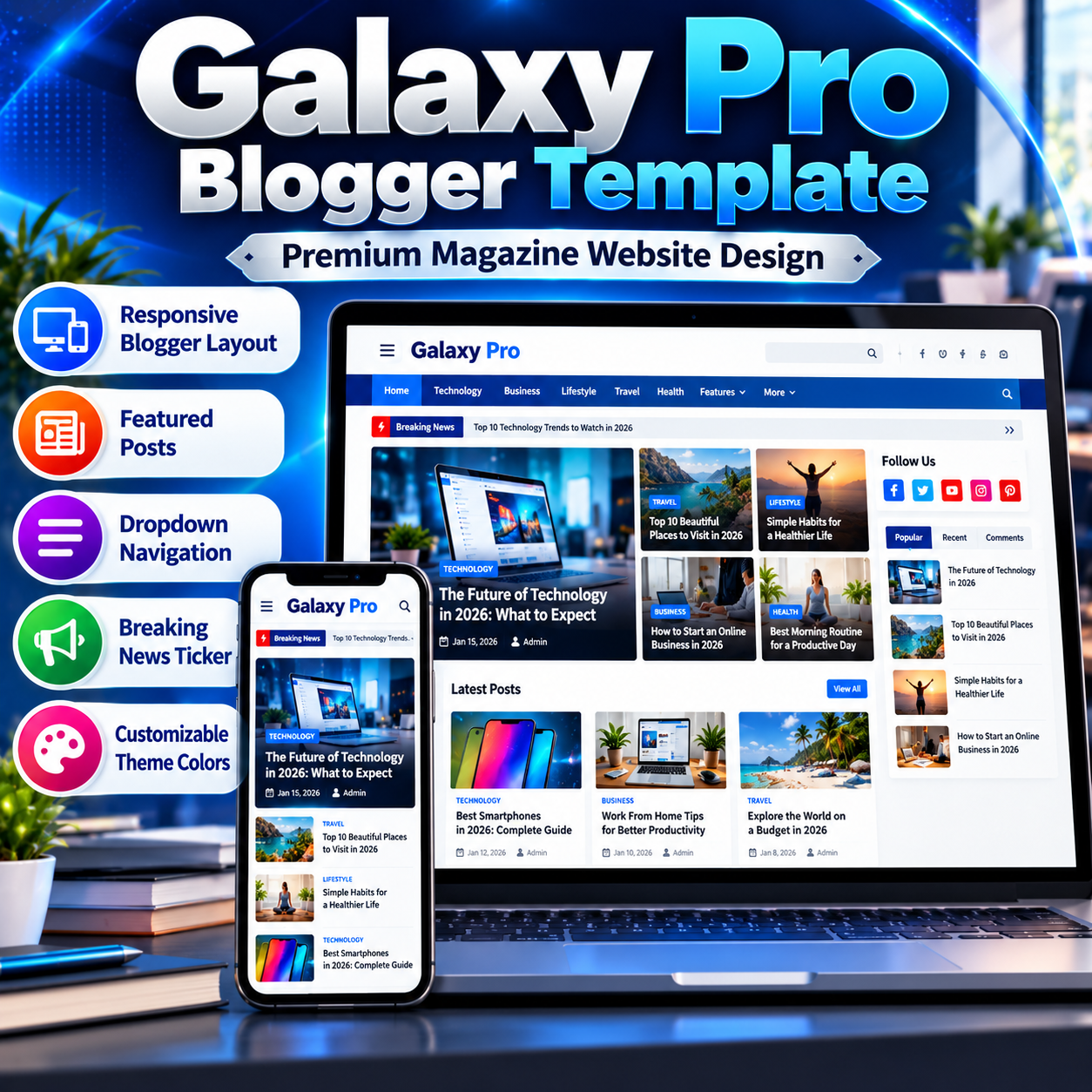
Build a professional magazine-style blog with the Premium Galaxy Pro Blogger Template, featuring featured posts, dropdown navigation, a breaking news ticker, sidebar widgets, customizable theme colors, and dedicated advertisement placement areas.
Platform: Blogger
File Format: XML (Blogger Template)
Demo: Live Preview
Delivery: Digital Download Link After Purchase.
Support: Contact Us on WhatsApp
Description
Premium Galaxy Pro Blogger Template is a feature-rich Blogger XML theme designed for bloggers, publishers, and website owners who want to create a professional magazine-style or news-style website. It combines a structured homepage, featured post sections, navigation menus, sidebar widgets, footer sections, social media links, and customizable theme styling in one Blogger template.
Build a Professional Blogger Website
The Galaxy Pro Blogger Template provides a structured layout for publishing articles, news, tutorials, reviews, and other blog content. Its homepage includes dedicated areas for featured posts, popular content, recent posts, and additional post sections. The layout is built around Blogger’s native template and widget system, allowing supported sections to be managed through the Blogger Layout interface.
The template uses a blue-accented design with configurable theme colors, typography settings, background options, and widget styling. Its CSS includes responsive layout rules for different screen widths, while the navigation and content sections help organize posts into a readable website structure.
Key Features
- Responsive Blogger layout: CSS media queries adapt selected layout elements and typography to different screen sizes.
- Featured posts sections: Dedicated homepage widget areas support featured and popular post displays.
- Magazine-style homepage: Multiple content sections help organize recent, featured, and trending posts.
- Top navigation menu: A dedicated top menu section supports configurable navigation links.
- Dropdown and submenu navigation: The included menu script processes configured menu links to create nested navigation items.
- Breaking news ticker: A ticker section includes previous and next controls and automatic item rotation.
- Popular and trending content: Dedicated widget areas are provided for popular posts and trending content.
- Sidebar widgets: A sidebar section supports Blogger widgets for additional content and navigation.
- Footer customization: Separate footer sections accommodate page links, social media links, copyright content, and additional post widgets.
- Theme color settings: Blogger theme variables provide configurable colors for backgrounds, links, headings, widgets, and other visual elements.
- Advertisement placement areas: The layout contains designated sections for responsive advertisement placement, including areas around post content and the footer.
- Social media links: Dedicated widget areas support social links, with external social services referenced by the source.
- Related posts support: The source includes related-post styling and a configured related-post count variable.
- Table of Contents styling: The stylesheet includes styling for a Table of Contents within post content.
- Image lazy-loading script: A JavaScript plugin is included to defer certain image-loading operations until they approach the visible page area.
- Post pagination: The template includes Blogger pagination and navigation structures for multiple-item views.
Homepage and Content Layout
The Galaxy Pro Blogger Template contains several configurable homepage sections for presenting different groups of posts. These include featured content, popular posts, recent posts, and additional content areas. The template also provides dedicated sections for a breaking news ticker and footer post widgets.
This structure can be useful for technology blogs, news websites, editorial publications, tutorials, and general-interest blogs. Actual homepage content depends on the Blogger widgets, published posts, labels, and configuration used on the installed website.
Navigation and Menu Structure
The source includes dedicated sections for top menu links, social links, and the main navigation area. Its menu script processes specially configured LinkList entries to create dropdown and nested submenu structures. Website owners should configure the relevant links through Blogger’s Layout interface and follow the template’s menu conventions.
The template also includes a breaking ticker component with navigation controls and an automatic rotation interval. The ticker’s visible content depends on the corresponding widget and website configuration.
Customization Options
The XML source defines theme variables for background colors, text colors, link colors, widget backgrounds, title colors, and other styling elements. These variables provide a starting point for adjusting the website’s appearance through the Blogger theme customization system where supported.
Additional layout sections are available for navigation, featured posts, sidebar widgets, advertising placeholders, and footer content. Website owners can configure supported widgets, menu links, page links, and social links through the Blogger Layout interface.
Advertisement Placement
The template includes dedicated advertisement sections identified in the source for placement above and below post content, beneath recent posts, and near the footer. Several areas are labelled for responsive advertising placement.
These sections provide locations for integrating compatible advertising code, but their presence does not guarantee that advertisements will automatically appear or that an advertising account will be approved. Advertising code must be configured separately and should comply with the applicable advertising provider policies.
SEO and Publishing Structure
The XML source includes metadata-related structures and references to canonical URLs, Open Graph metadata, and external services. These elements can support a website’s technical publishing setup, but they do not guarantee search engine rankings, indexing, rich results, or traffic.
For best results, configure the Blogger search preferences, page titles, descriptions, custom domain settings, navigation links, and post content appropriately. Review the final page source after installation to confirm that metadata and canonical URLs are generated correctly for the live website.
Technical Requirements
- A Blogger account and an active Blogger blog are required to install and use this XML theme.
- The supplied product file is a Blogger XML template, not a WordPress theme or a standalone HTML website.
- The source references jQuery, Font Awesome, Google Fonts, Blogger resources, and other external services.
- Some menu, ticker, image-loading, and content-display behavior depends on JavaScript and the configured Blogger widgets.
- External libraries and resources must remain accessible for the related features to work as intended.
- Existing blog content, widgets, menu links, and settings should be backed up before changing the current Blogger theme.
- Theme compatibility and the behavior of individual widgets should be tested on the target blog before publication.
Installation Overview
Back up the existing Blogger theme before installing a new XML template. Open the Blogger dashboard, navigate to the Theme section, and use the available restore or upload option to upload the supplied XML file. After installation, open the Layout section to review the available widgets and configure navigation menus, featured content, sidebar sections, social links, and footer areas.
Preview the website on desktop and mobile screens after installation. Check the homepage, individual posts, label pages, navigation menus, pagination, footer links, and any advertising placements you intend to use. Some widgets may require additional configuration before the website matches the desired appearance.
Frequently Asked Questions
What is the Galaxy Pro Blogger Template?
It is a Blogger XML theme with a magazine-style layout, multiple post sections, navigation menus, sidebar widgets, and customizable footer areas.
Can I use this template for a news or technology blog?
The layout can be adapted for news, technology, tutorials, reviews, and general blogging. The final appearance depends on the published content and widget configuration.
Does it include advertisement placement areas?
Yes. The XML source includes designated sections for advertisement placement. Advertising code and account settings must be configured separately.
Can I customize the colors and menus?
The source includes theme color variables and dedicated menu widget areas. Supported colors, menu links, and layout widgets can be configured according to the available Blogger options and the template’s structure.
Is this a WordPress theme?
No. This product is a Blogger XML template designed for the Blogger platform. It is not a native WordPress theme or plugin.
Does the template guarantee SEO rankings or faster loading?
No template can guarantee rankings or a specific loading speed. Results depend on hosting and platform behavior, content, external resources, advertising scripts, images, and website configuration.
Who Is This Template For?
Premium Galaxy Pro Blogger Template is intended for bloggers, publishers, news website owners, and content creators who want a structured Blogger website with featured content, navigation menus, sidebar widgets, and customizable theme styling.
Before publishing, configure the available widgets, menus, social links, and content sections, then test the website on different screen sizes. This helps ensure that the installed template matches your intended website layout and publishing requirements.
Related products
-
Sale!

Galaxy Blogger Template & Content Starter Bundle
Original price was: ₹2,000.00.₹700.00Current price is: ₹700.00. Buy Now -
Sale!
Premium SuperMag Pro Blogger Template
Original price was: ₹999.00.₹399.00Current price is: ₹399.00. Buy Now -
Sale!
Premium Color UI Pro Blogger Template
Original price was: ₹999.00.₹399.00Current price is: ₹399.00. Buy Now