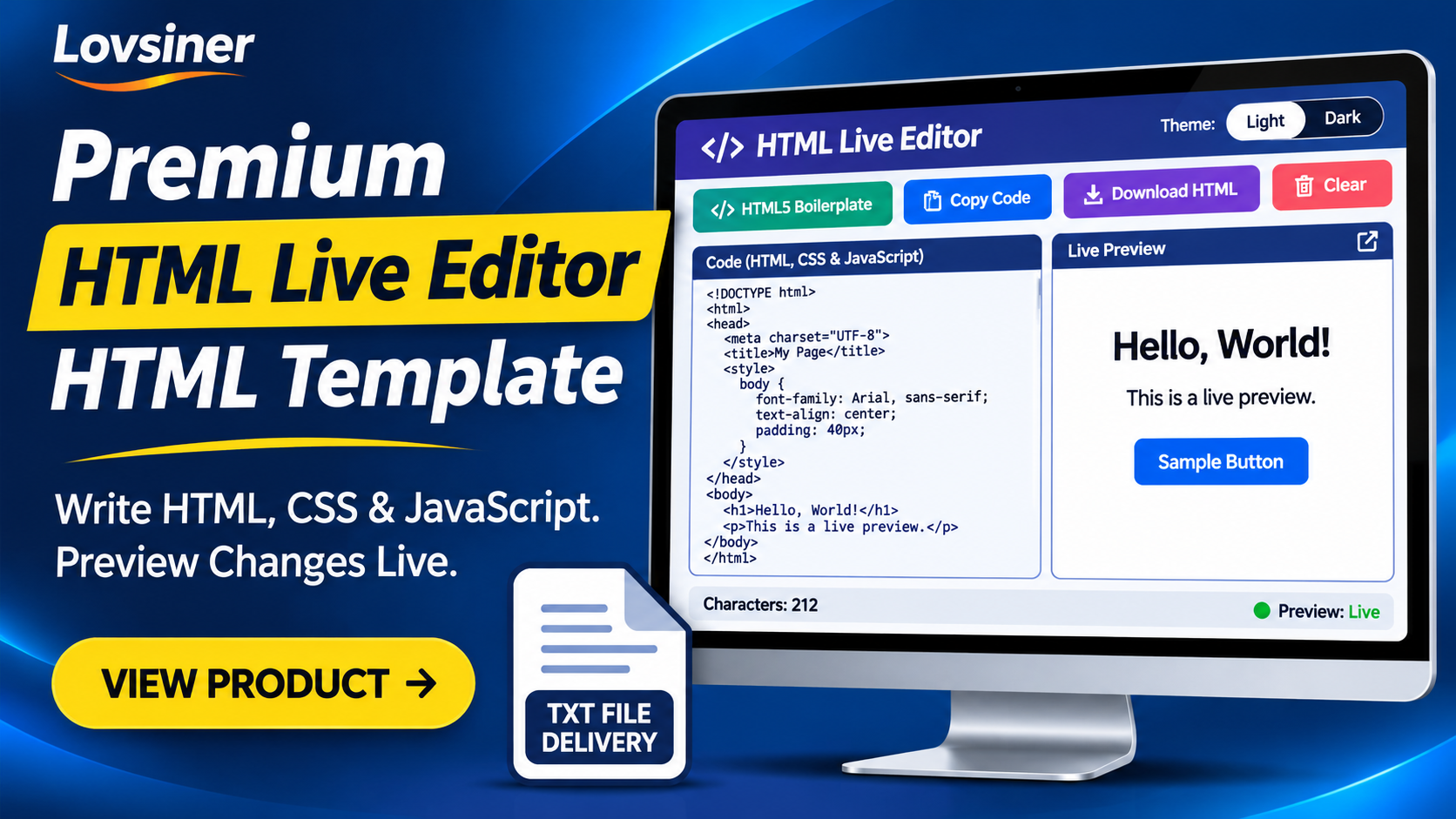
Working With HTML, CSS, And JavaScript Often Requires A Convenient Place To Write Code And Check How It Appears In A Browser. The Premium HTML Live Editor HTML Template Provides A Browser-Based Editing Workspace With A Separate Live Preview, Helping Users Experiment With Webpage Structure, Styling, And Basic JavaScript In One Interface.
Designed For People Who Want A Focused HTML Editing And Preview Experience, This HTML Live Editor Brings Useful Coding Controls Together In A Simple Workspace. It Can Be Used To Practise Front-End Development, Test Small Code Examples, Explore Page Layouts, And Demonstrate How Website Code Works.
What Is Premium HTML Live Editor HTML Template?
Premium HTML Live Editor HTML Template Is A Browser-Based HTML, CSS, And JavaScript Editing Template. It Provides A Code Input Area Where Users Can Write Or Paste Their HTML Document And A Separate Preview Area That Displays The Rendered Result.
When The Code Changes, The Preview Refreshes Automatically After A Short Delay. This Makes It Easier To Observe The Relationship Between Code And The Resulting Webpage Without Repeatedly Switching Between Separate Editing And Preview Screens.
Who Can Use This HTML Live Editor?
This Product Can Be Useful For Different People Working With Website Code And Front-End Concepts.
- Beginners: Practise HTML Tags, Attributes, CSS Rules, And Basic JavaScript While Observing The Result.
- Students: Experiment With Small Coding Examples And Understand How Webpage Structure And Styling Work Together.
- Teachers: Demonstrate Basic Front-End Concepts And Show How Code Produces A Rendered Webpage.
- Web Designers: Try Simple Page Layouts And Visual Ideas Before Incorporating Them Into Larger Projects.
- Developers: Test Small HTML Examples And Front-End Snippets Without Opening A Complete Development Project.
Key Features Of Premium HTML Live Editor HTML Template
1. HTML, CSS, And JavaScript Editing
Write HTML In The Main Editing Area And Include CSS Inside Style Tags And JavaScript Inside Script Tags. This Provides A Single Workspace For Working With The Core Technologies Used To Build Webpages.
2. Separate Live Preview
The Live Preview Area Displays The Rendered Output Of Your Entered Code. When You Make Changes, The Preview Refreshes Automatically After A Short Delay, Helping You Check Your Work As You Edit.
3. HTML5 Boilerplate Control
The HTML5 Boilerplate Control Inserts A Starter HTML Document. It Includes A Doctype, Basic Document Structure, Viewport Metadata, A Sample Title, Basic Styling, And Sample Page Content To Help You Begin.
4. Copy Code Control
Use The Copy Code Control To Copy Your Current Editor Contents. It Uses Browser Clipboard Functionality When Available And Includes A Fallback Copy Method.
5. Download HTML Control
The Download HTML Control Allows You To Save Your Current Editor Contents As An HTML Document On Your Device.
6. Clear Control
The Clear Control Removes The Current Editor Contents And Refreshes The Preview, Giving You A Fresh Starting Point For Another Coding Experiment.
7. Character Counter
A Character Counter Displays The Current Length Of The Code Entered In The Editor. It Provides A Quick Way To Check How Much Text Is Present In The Editing Area.
8. Preview Status Indicator
The Preview Status Indicator Helps You See When The Preview Has Been Updated As Part Of The Editing Workflow.
9. Light And Dark Theme Options
Theme Switching Provides Light And Dark Appearance Options, Allowing Users To Choose Their Preferred Editor Appearance.
10. Responsive Interface
The Interface Uses Flexible Layout Rules To Adapt To Different Display Widths. Its Navigation, Toolbar, Editor, And Preview Areas Are Designed To Fit Different Screen Sizes, Although The Exact Experience Can Vary By Device And Deployment Method.
How The HTML Live Editor Works
The Editing Workflow Is Straightforward:
- Open The HTML Live Editor In A Modern Web Browser.
- Enter Or Paste Your HTML Document Into The Code Input Area.
- Add CSS Inside Style Tags And JavaScript Inside Script Tags When Required.
- Check The Rendered Webpage In The Separate Live Preview Area.
- Use The HTML5 Boilerplate Control When You Need A Starter HTML Document.
- Use Copy Code Or Download HTML To Save Your Current Work.
- Use Clear When You Want To Remove The Existing Code And Start Again.
Remember To Copy Or Download Your Work Before Leaving Or Refreshing The Page Because Editor Contents Are Not Automatically Saved Between Visits.
Live Demo And Product Preview
You Can Explore The Live Demo To Get A Better Understanding Of The HTML Live Editor Interface And Its Editing Workflow Before Making A Purchase Decision. The Demo Provides An Opportunity To See The Product Experience And Evaluate Whether Its Features Match Your Requirements.
Open The HTML Live Editor Live Demo To Explore The Available Interface.
Customization And Website Integration
The Template Contains HTML, CSS, And JavaScript That Website Owners And Developers Can Adapt. Available Customization Areas Include The Page Title, Visible Text, Site Information, Contact Details, Layout, Colors, Navigation Labels, And Other Content Within The Relevant Source Sections.
The Template Is Listed For Use With Blogger, WordPress, And Web Hosting Platforms. However, It Is Not A Native Blogger XML Theme Or A WordPress Plugin. The Integration Method May Depend On Your Platform, Theme, Hosting Environment, Permissions, And Script Restrictions.
Using It With Blogger
For Blogger, The Template May Need Adjustments For A Supported Page, Post, Or Embedding Area. Blogger Can Sanitize, Rearrange, Or Restrict Parts Of A Complete HTML Document And Its Scripts. Therefore, Platform-Specific Adaptation May Be Necessary.
Using It With WordPress
For WordPress, Possible Integration Methods Include A Suitable Custom HTML Block, Page Or Template Method, Or A Separately Hosted HTML Page. The Appropriate Approach Depends On Your WordPress Setup And Whether The Selected Location Allows The Required Styles And Scripts.
Using It With Web Hosting
On A Standard Web-Hosting Platform, The Template Can Be Adapted For A Suitable Web Directory, Provided The Hosting Environment Supports The Files And Scripts Used By The Template.
Technical Requirements And Important Limitations
- A Modern Browser Supporting Standard HTML, CSS, JavaScript, Iframe Srcdoc, And Browser File-Download Behavior Is Recommended.
- The Core Editing And Preview Workflow Runs In The Browser After The Page Has Loaded.
- The Supplied Implementation Does Not Include An Application API Connection, Database Integration, Or Server-Side Code Processing.
- Editor Contents Are Not Automatically Saved Between Visits.
- The Preview Uses A Sandboxed Iframe, So Browser Security Rules And Iframe Restrictions May Affect Certain Scripts Or Browser Features.
- External Images, Fonts, Scripts, And Other Remote Resources Referenced In Your Code May Require An Internet Connection.
- The Editor Uses A Standard Text Area And Does Not Include Syntax Highlighting, Automatic Code Completion, Debugging Tools, Or Project File Management.
- Large Or Complex Documents May Affect Preview Responsiveness Depending On The Device And Browser.
This Product Is Intended As A Focused Browser-Based Editing And Preview Utility Rather Than A Complete Integrated Development Environment. Review The Platform Requirements And Limitations Before Choosing An Integration Method.
Frequently Asked Questions
1. What Is Premium HTML Live Editor HTML Template?
It Is A Browser-Based HTML, CSS, And JavaScript Editing Template With A Separate Live Preview Area For Viewing Rendered Webpage Output.
2. Can I Write HTML, CSS, And JavaScript In The Editor?
Yes. You Can Write HTML In The Editor, Include CSS Inside Style Tags, And Add JavaScript Inside Script Tags. Script Execution In The Preview Is Subject To Browser And Sandbox Restrictions.
3. Does The Preview Update Automatically?
Yes. The Preview Refreshes Automatically After A Short Delay When You Change The Code In The Editor.
4. Can I Copy My Code?
Yes. The Copy Code Control Lets You Copy Your Current Editor Contents Using Browser Clipboard Functionality When Available, With A Fallback Method Included.
5. Can I Download My Current HTML Work?
Yes. The Download HTML Control Allows You To Save Your Current Editor Contents As An HTML Document.
6. Does The Editor Automatically Save My Work?
No. Editor Contents Are Not Automatically Retained Between Visits. Copy Or Download Your Work Before Leaving Or Refreshing The Page.
7. Can I Use This Template With Blogger And WordPress?
The Product Is Listed For Blogger, WordPress, And Web Hosting Platforms. However, It Is Not A Native Blogger XML Theme Or A WordPress Plugin. Platform-Specific Adjustments May Be Required.
8. Is This A Complete Professional Development Environment?
No. It Is A Focused Editing And Preview Utility. It Does Not Include Advanced IDE Features Such As Syntax Highlighting, Automatic Code Completion, Debugging Tools, Or Project File Management.
9. Is A Live Demo Available?
Yes. You Can Visit The Live Demo To Explore The HTML Live Editor Interface And Its Demonstrated Workflow.
Explore Premium HTML Live Editor HTML Template
If You Need A Focused Workspace For Writing HTML, CSS, And JavaScript And Checking The Rendered Result, Premium HTML Live Editor HTML Template Brings These Everyday Editing Tasks Together In One Browser-Based Interface.
Explore The Product Details, Review Its Features, And Try The Live Demo To Decide Whether It Fits Your Website Or Development Workflow.
Website Links
- Product Page: Premium HTML Live Editor HTML Template
- Live Demo: HTML Live Editor Demo
- Home: Lovsiner